Constraints are rules applied to columns or sets of columns within a table to enforce data integrity and consistency. They limit the type and range of values that can be entered into columns, preventing invalid or inconsistent data from being stored.
Common types of constraints include PRIMARY KEY, NOT NULL, UNIQUE, DEFAULT, CHECK, AUTO INCREMENT and FOREIGN KEY. Constraints can be defined at the time of table creation using the CREATE TABLE statement. In SQLite, we cannot add constraints to an existing table using ALTER TABLE … ADD CONSTRAINT SQL command like in other database system.
Commonly used Constraint
Primary Key
In SQLite, PRIMARY KEY is contraint of a column or set of columns that uniquely identifies each row in a table. It is crucial for maintaining data integrity, ensuring no duplicate records, and enabling efficient data retrieval. A table can have only one primary key, but it can be composed of multiple columns (a composite key). Primary keys are typically defined during table creation using the CREATE TABLE statement.
Single Column Primary Key:
Example:
create table student(rollno int primary key, name text);

Composite Primary Key:
Example:
create table enrollments (student_id int, course_id int, enrollment_date date, primary key (student_id, course_id));

Not Null
The NOT NULL constraint ensures that a column or columns cannot have NULL or undefined values. Every row must have a value for that column. If an attempt is made to insert or update a row with a NULL value in a NOT NULL column, SQLite will issue an error. It is useful for columns that require a value in every row, like id, name, or other essential fields.
Example – 1:
create table students (rollno int primary key, name text not null, address text);

Example – 2:
CREATE TABLE Users (User_ID int primary key, UserName text not null, UserEmail text not null);

Unique
Unique constraint ensures that all values in a column are distinct. It prevents the insertion of duplicate values in specified columns i.e. no duplicate values are allowed. It guarantees that all values in a column (or a group of columns) are unique across the table.
Example:
create table students(rollno int primary key, name text, ph_no int unique);

Default
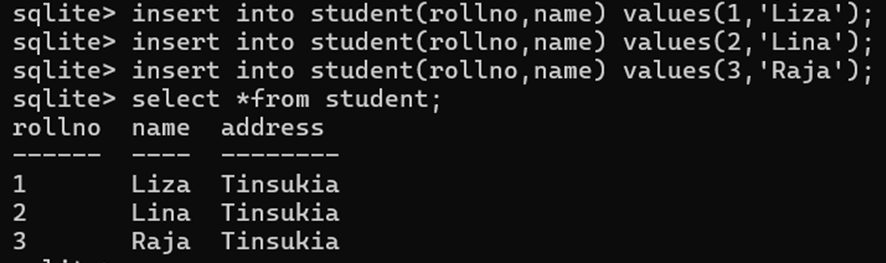
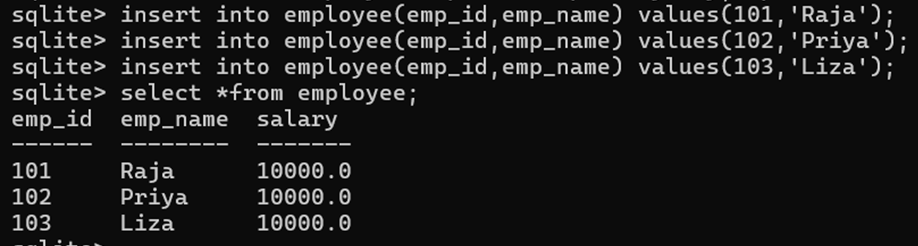
Default constraint is used to define default values for a column. It specifies a default value for a column if no value is provided during an INSERT operation. It is useful for providing automatic values, such as default text or numeric values.
Example – 1:
create table student (rollno int primary key, name text, address text default ‘Tinsukia’);
Example – 2:
create table employee(emp_id int primary key, emp_name text not null, salary real default 10000.00);
Check
The check constraint specifies a condition that must be true for all values in a column. If the condition evaluates to FALSE, a constraint violation occurs. This constraint ensures that when the data is entered, the data in the column is limited to specific values.
Example – 1:
create table employees (emp_id int primary key, name text, age int check(age>=18));

Example – 2:
create table employee (id int primary key, name text not null, salary real check(salary>10000));

Auto Increment
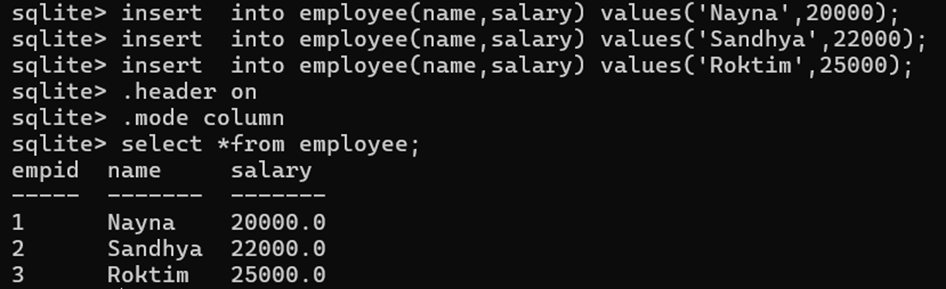
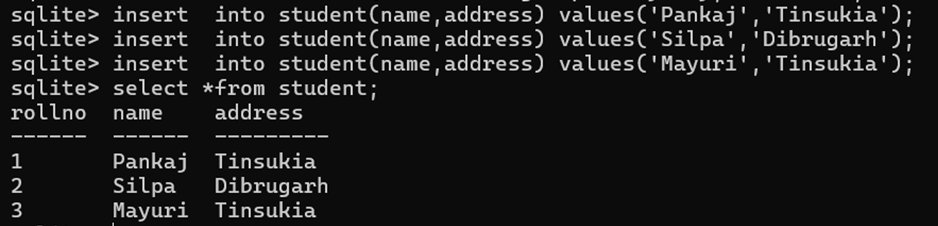
Auto Increment constraint autoincrementing a value of a field in the table. AUTOINCREMENT can be added to an INTEGER PRIMARY KEY to automatically generate sequential values. The main purpose of using attribute AUTOINCREMENT is to prevent SQLite to reuse a value that has not been used or a value from the previously deleted row.
Example – 1:
create table employee(empid integer primary key autoincrement, name text not null, salary real);
Example – 2:
create table student(rollno integer primary key autoincrement, name char, address char);
Foreign Key
Foreign Key constraint establishes a link between two tables, ensuring referential integrity. It enforces that values in a child table’s Foreign Key column must correspond to existing values in the parent table’s Primary Key column.
To enforce foreign keys, SQLite requires enabling PRAGMA Foreign_Keys = ON; because they are off by default.
Example:
PRAGMA Foreign_Keys = ON;
CREATE TABLE departments (dept_id INTEGER PRIMARY KEY, name TEXT NOT NULL);
CREATE TABLE employees (emp_id INTEGER PRIMARY KEY, name TEXT NOT NULL, dept_id INTEGER, FOREIGN KEY (dept_id) REFERENCES departments (dept_id));