1. Create the following table, “students” and insert the data into the table.
| roll_no | name | address | birth_date |
| 1 | Liza | Tinsukia | 2002-02-12 |
| 2 | Pritom | Dibrugarh | 2000-03-10 |
| 3 | Arjina | Tinsukia | 2001-02-11 |
| 4 | Monica | Jorhat | 1995-04-03 |
| 5 | Alija | Guwahati | 1995-01-01 |
| 6 | Amisha | Tinsukia | 2011-02-05 |
| 7 | Kishor | Jorhat | 2002-02-01 |
| 8 | Anuj | Tinsukia | 1998-01-02 |
| 9 | Barsha | Dibrugarh | 1996-03-06 |
| 10 | Pahi | Tinsukia | 2012-02-06 |
create table students(roll_no int, name char, address char, birth_date date);
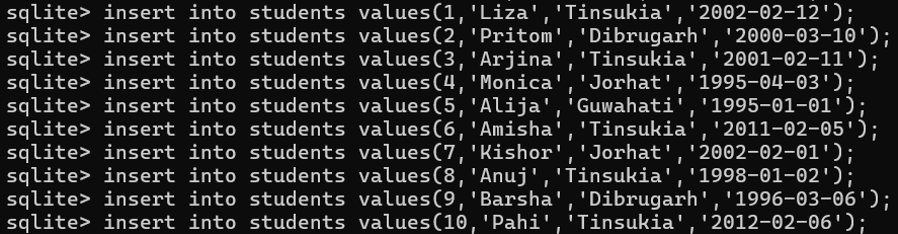
Write SQL commands for the following on the basis of above table.
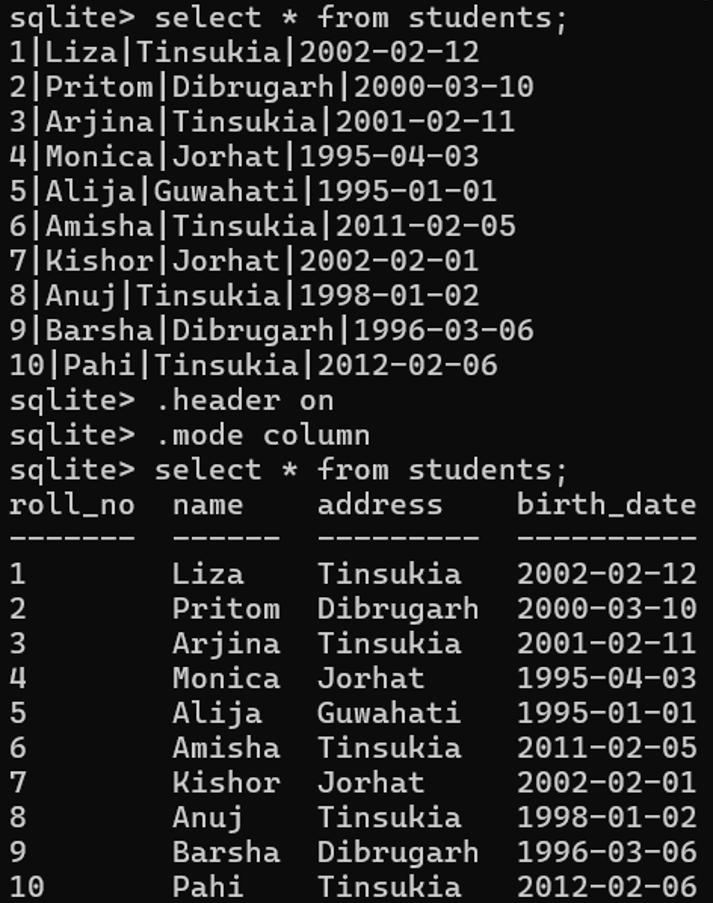
(i) Display all records of students from the above table.
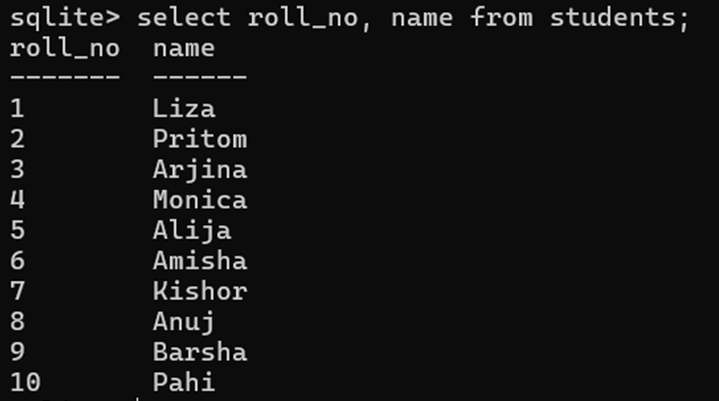
(ii) Display roll number and name of students.
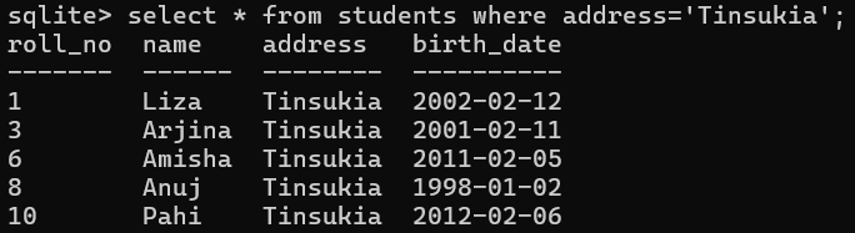
(iii) Display the details of students who are from ‘Tinsukia’.
(iv) List the name and birth date of students in Dibrugarh.

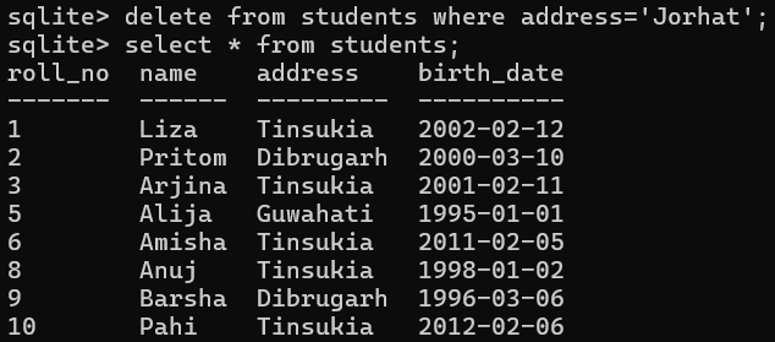
(v) Delete all the records from the table where address has the value ‘Jorhat’.
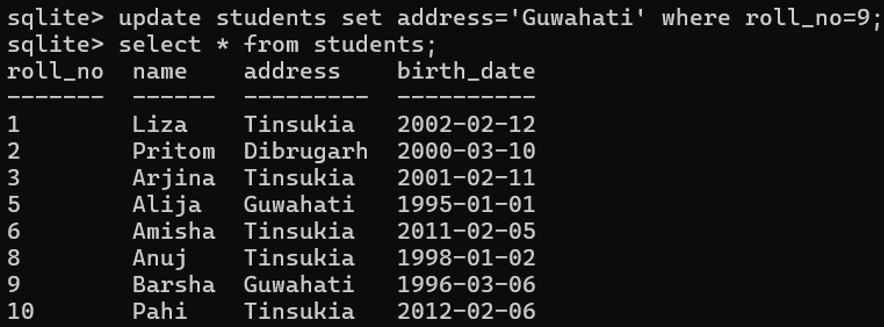
(vi) Change the address of roll number 9 from Dibrugarh to Guwahati.
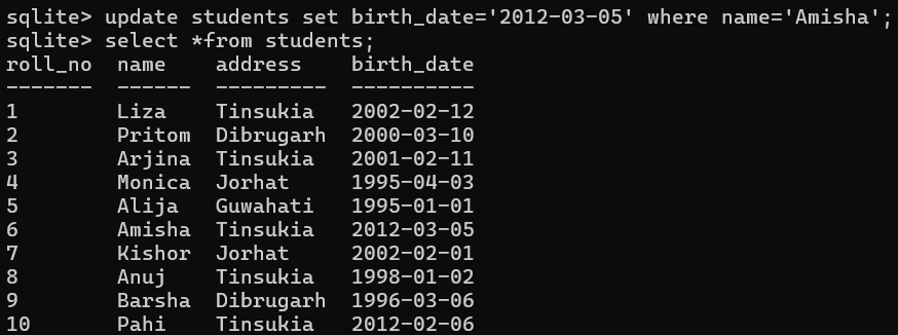
(vii) Change the value of birth date column to ‘2012-03-05’ where the name column has the value ‘Amisha’.
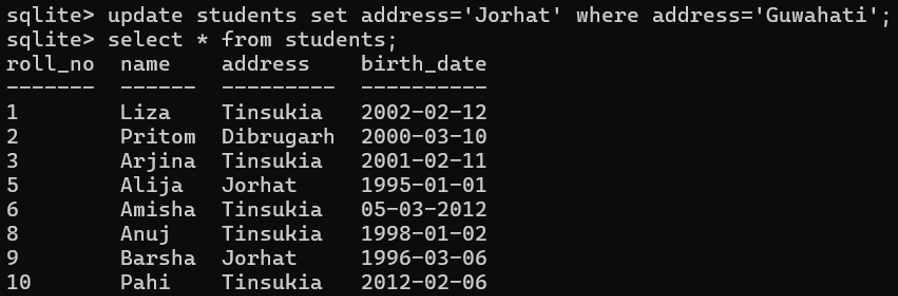
(viii) Change “Guwahati” to “Jorhat” in the address column in students table.
(ix) Change the name of the table, from students to student.

(x) Add a new column, phone_no in the table student.
sqlite> alter table student add column phone_no char;
sqlite> .schema student
CREATE TABLE student(roll_no int,name char,address char,birth_date date, phone_no char);
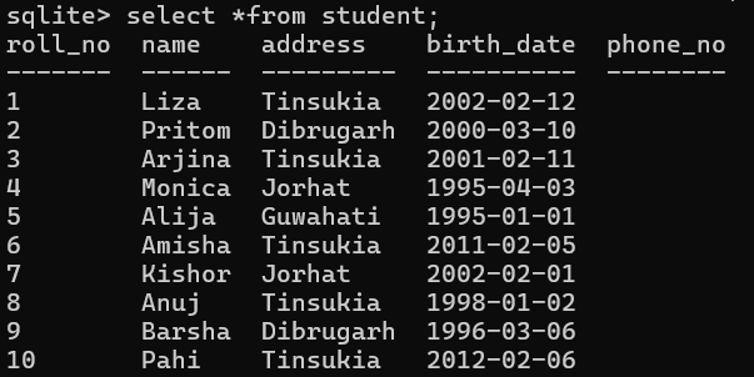
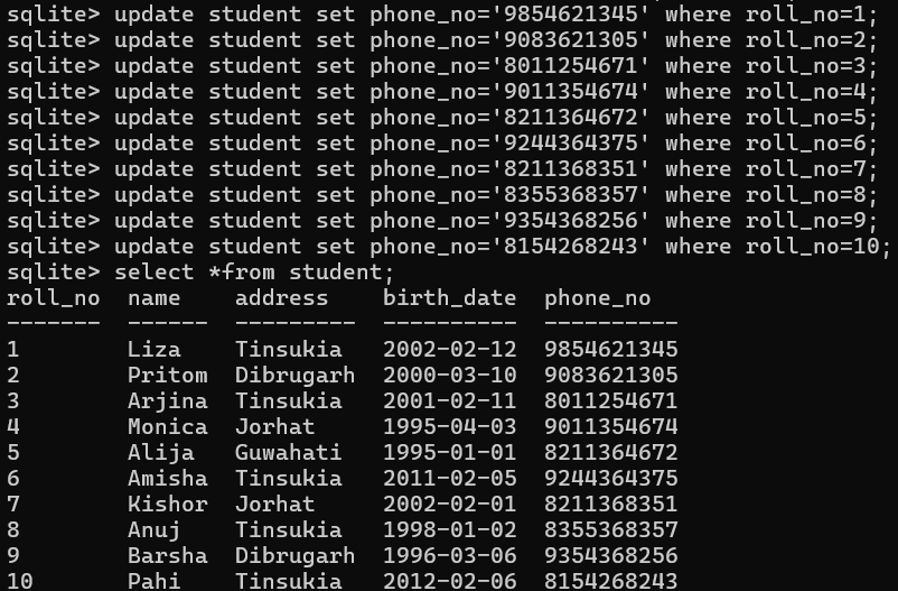
(xi) Add data in the column phone_no of student table.
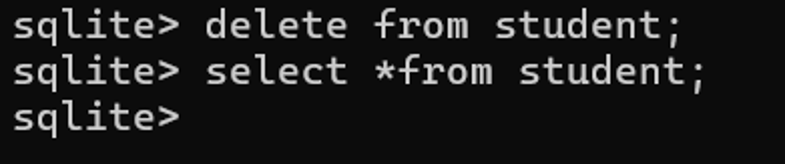
(xii) Delete all the data from the student table.
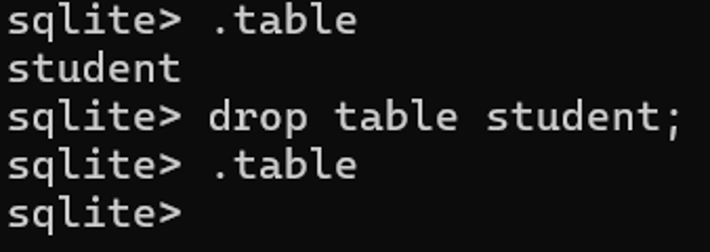
(xiii) Remove or delete the table student from sqlite database.
2. Write SQL commands for the following on the basis of given table STUDENT.
| StudentNo | Class | Name | Game | Grade1 | SUPW | Grade2 |
| 1 | 11 | Rahul | Cricket | B | Photography | A |
| 2 | 12 | Rajesh | Tennis | A | Gardening | C |
| 3 | 10 | Bipul | Swimming | B | Photography | B |
| 4 | 11 | Priya | Tennis | C | Cooking | A |
| 5 | 12 | Aakash | Basketball | A | Literature | A |
| 6 | 10 | Pratima | Cricket | A | Gardening | C |
create table STUDENT(studentNo int, Class int, Name char, Game char, Grade1 char, SUPW char, Grade2 char);
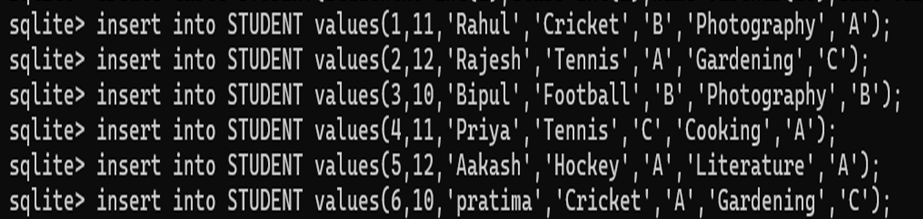
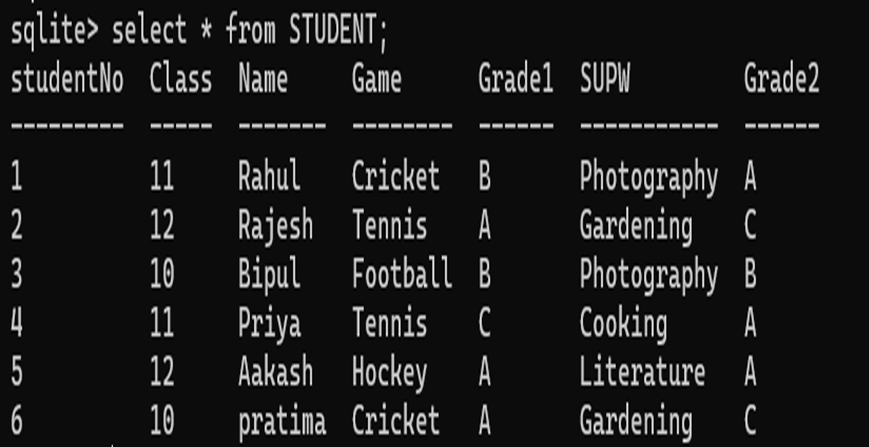
(i) Display all the student’s records from the table.
(ii) Display the records of students who are studying in class 12.

(iii) Display the name of the students who plays game tennis.

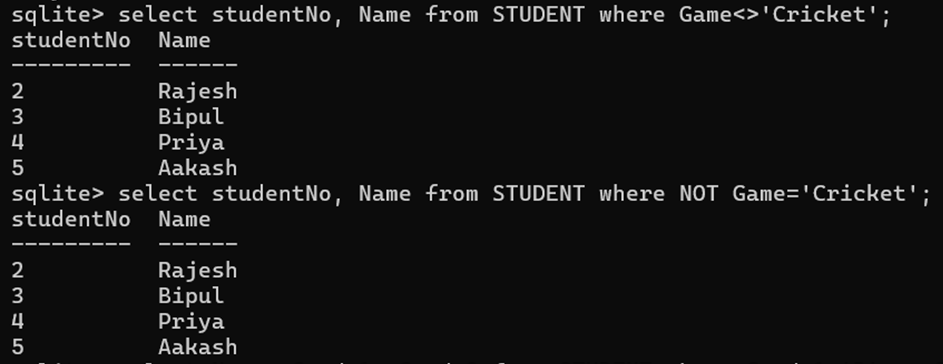
(iv) Display the StudentNo and name of those students who does not play cricket.
(v) Display the name, grade1 and grade2 of the students who are getting grade ‘B’ in either Game or SUPW or both.

(vi) Display the name, grade1 and grade2 of the students who are getting grade ‘A’ in both Game and SUPW.

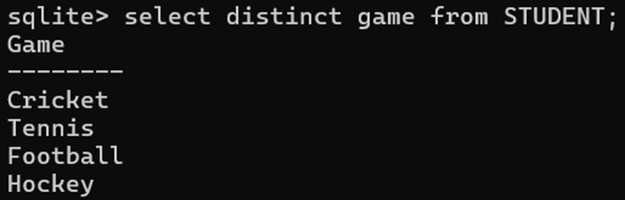
(vii) Display the different games offered in the school.
(viii) Display the name and SUPW of the students whose name starts with ‘R’.

(ix) Display the StudentNo and name of those students who have got same grade in Grade1 and Grade2.

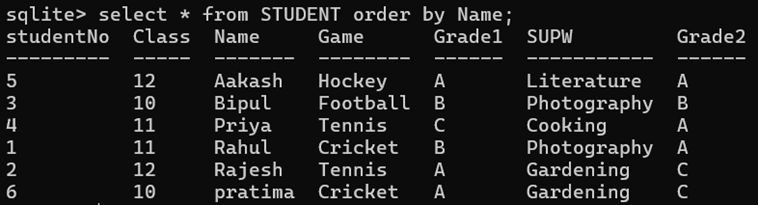
(x) Display all information of students in the alphabetic order of their name.
3. Write SQL commands for the following on the basis of table SPORTS.
| StudentNo | Class | Name | Game1 | Grade1 | Game2 | Grade2 |
| 1 | 5 | Rohit | Cricket | B | Swimming | A |
| 2 | 6 | Debojit | Tennis | A | Skating | C |
| 3 | 5 | Arman | Swimming | B | Football | B |
| 4 | 8 | Manisha | Tennis | C | Tennis | A |
| 5 | 9 | Dhiraj | Basketball | A | Cricket | A |
| 6 | 10 | Isha | Cricket | A | Athletics | C |
create table SPORTS(studentNo int, Class int, Name char, Game1 char, Grade1 char, Game2 char, Grade2 char);

(i) Display the name, grade1 and grade2 of those students who are getting grade ‘C’ in either Game1 or Game2 or both.

(ii) Display the name, game1 and game2 of those students who have same game for both game1 and game2.

(iii) Display the name, grade1 and grade2 of the students who are getting grade ‘B’ in both Game1 and Game2.

(iv) Display the name and games (Game1, Game2) taken by the students whose name starts with ‘D’.

(v) Display the name and class of those students whose name ends with ‘a’.
OR
display the name and class of students whose name contains ‘a’ as the last alphabet.

(vi) Display the name of the students having ‘h’ as the third character.
OR
display the name of students whose name contains ‘h’ as the third alphabet.

(vii) Display the name of the students whose name contains ‘D’ as first alphabet and ‘i’ as third alphabet.

(viii) Write an SQL query to display the name of students whose name starts with ‘D’ and ends with ‘t’.

(ix) Show the name of the the students whose name length is 4 and starts with ‘I’.

(x) List the names of the students whose name has only 5 characters and starts with ‘A’ and ending with ‘n’.

(xi) Write an SQL query to find those students whose name ends with ‘a’ and seven character long.

(xii) Display the names of the students whose name starts either with ‘M’ or with ‘D’.

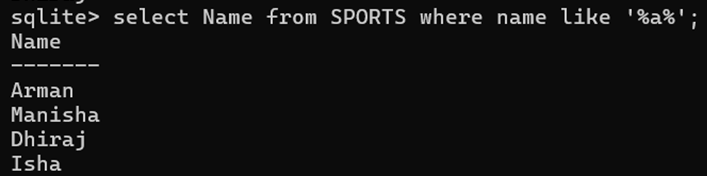
(xiii) List the students name whose names containing the letter ‘a’.
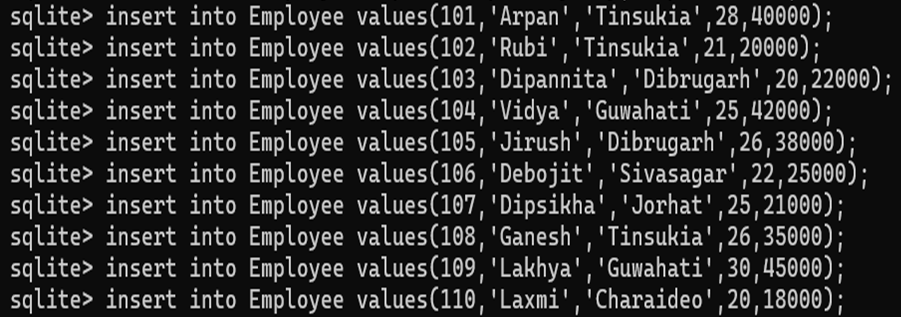
4. Create the following table ‘Employee’ and insert the data into the table. Based on the table, solve the following queries.
| EmpID (Primary Key) | EmpName | Address | Age | Salary |
| 101 | Arpan | Tinsukia | 28 | 40000 |
| 102 | Rubi | Tinsukia | 21 | 20000 |
| 103 | Dipannita | Dibrugarh | 20 | 22000 |
| 104 | Vidya | Guwahati | 25 | 42000 |
| 105 | Jirush | Dibrugarh | 26 | 38000 |
| 106 | Debojit | Sivasagar | 22 | 25000 |
| 107 | Dipsikha | Jorhat | 25 | 21000 |
| 108 | Ganesh | Tinsukia | 26 | 35000 |
| 109 | Lakhya | Guwahati | 30 | 45000 |
| 110 | Laxmi | Charaideo | 20 | 18000 |
create table Employee(EmpID int primary key, EmpName char, Address char, Age int, Salary int);
(i) Write the SELECT command to display the details of the employee with empid as 104.

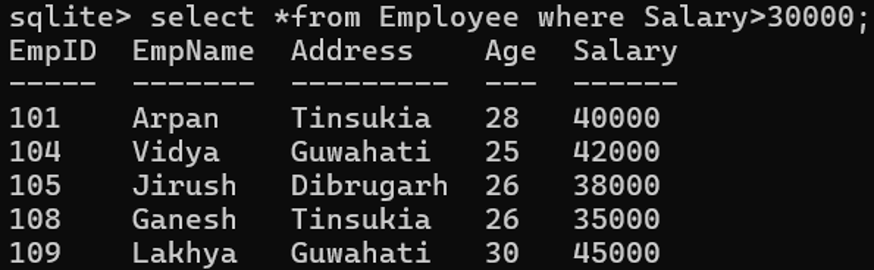
(ii) Write the SELECT command to display all the records of those employees who are getting salary more than 30000.
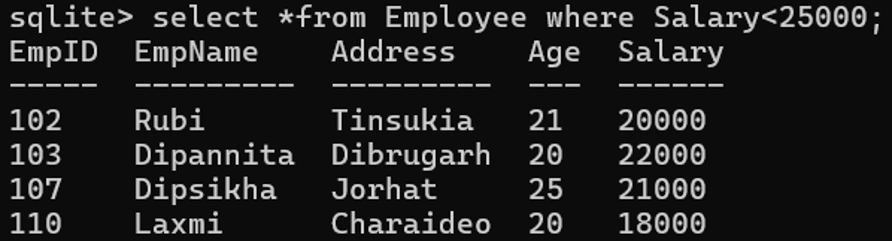
(iii) Write the SELECT command to display the employee’s records who are getting salary less than 25000.
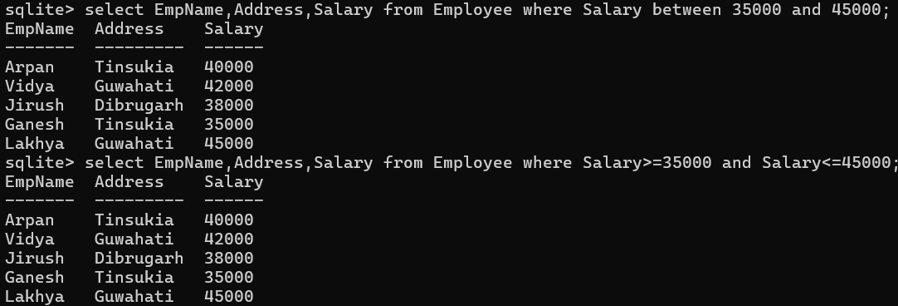
(iv) List out the employee’s name, address and salary who are earning salary between 35000 and 45000.
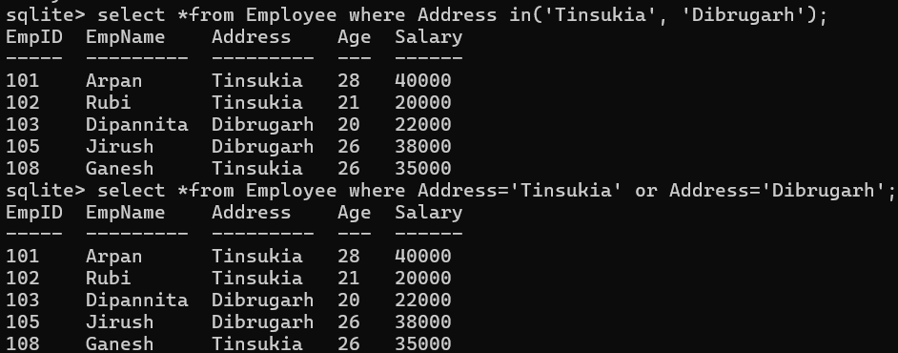
(v) Display the details of employees who are from Tinsukia or Dibrugarh.
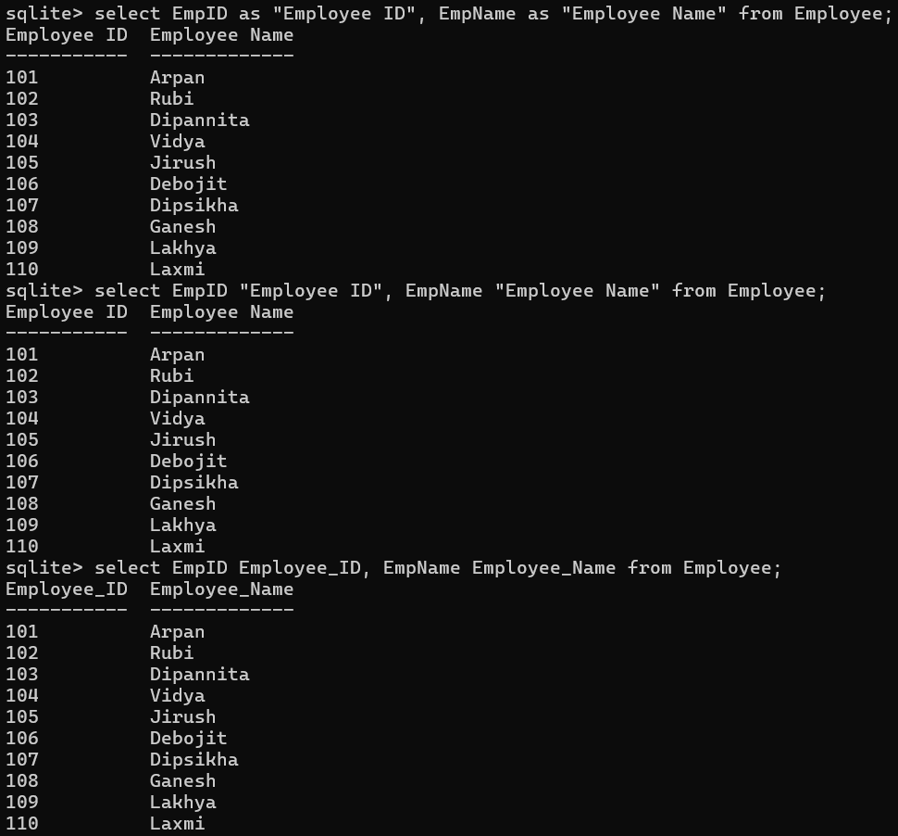
(vi) Display the ID and name of employees using alias name “Employee ID”, “Employee Name”.
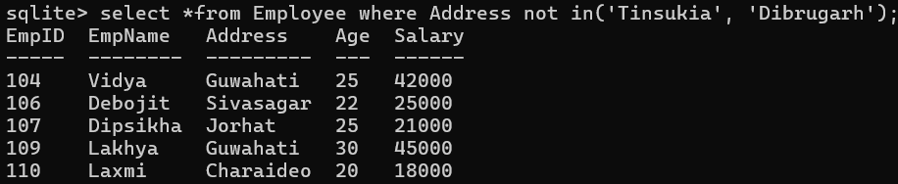
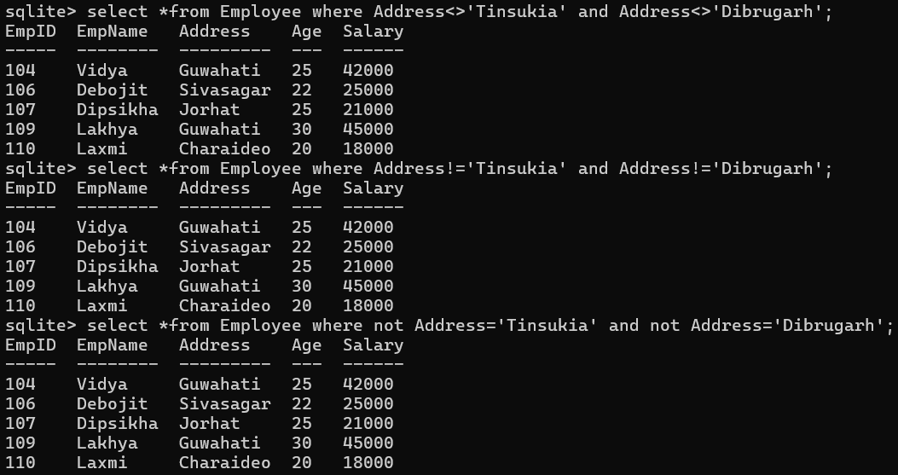
(vii) Display the details of employees who are not from Tinsukia or Dibrugarh.
(viii) List out the employees who are from Tinsukia and draw the salaries more than 25000.

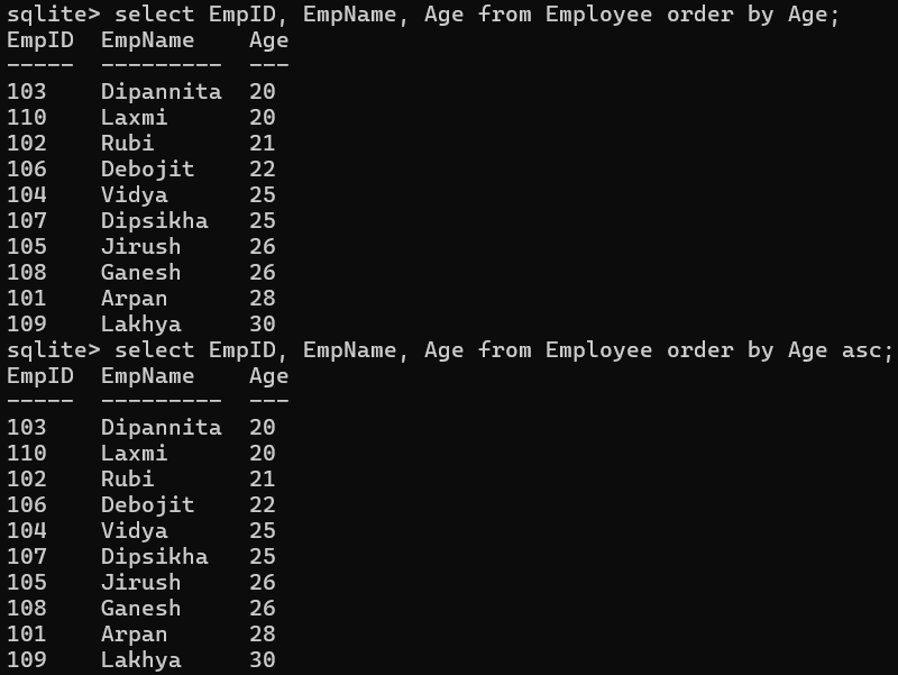
(ix) Write a SELECT command to display id, name and age of the employees with their age in ascending order.
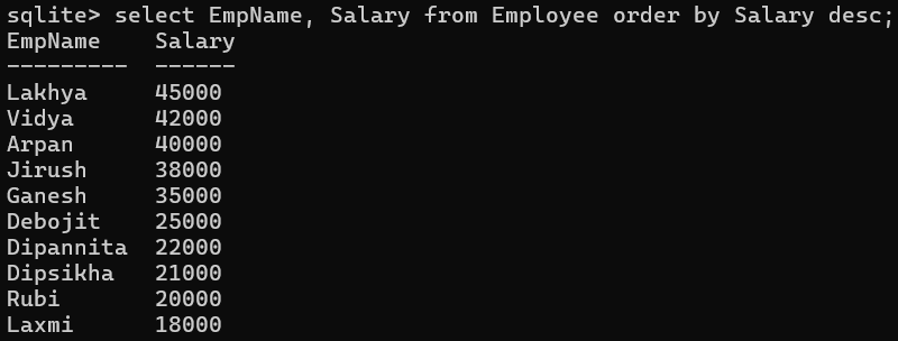
(x) List out the employee’s name and salary in descending order based on salary column.
5. Write SQL commands for the following on the basis of the given table EMPLOYEES.
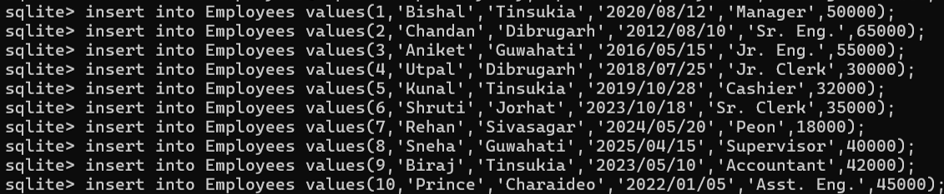
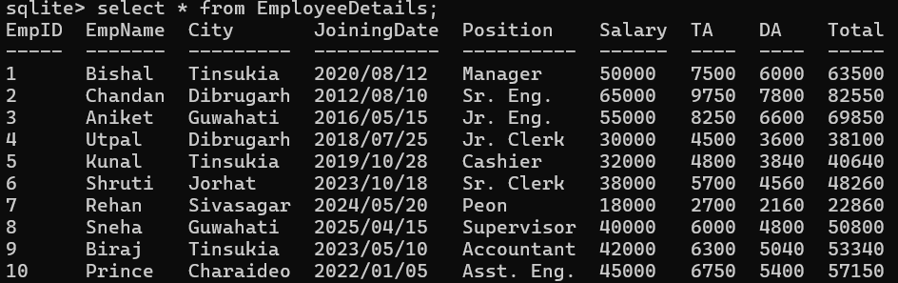
| EmpID (Primary Key) | EmpName | City | JoiningDate | Position | Salary |
| 1 | Bishal | Tinsukia | 2020/08/12 | Manager | 50000 |
| 2 | Chandan | Dibrugarh | 2012/08/10 | Sr. Eng. | 65000 |
| 3 | Aniket | Guwahati | 2016/05/15 | Jr. Eng. | 55000 |
| 4 | Utpal | Dibrugarh | 2018/07/25 | Jr. Clerk | 30000 |
| 5 | Kunal | Tinsukia | 2019/10/28 | Cashier | 32000 |
| 6 | Shruti | Jorhat | 2023/10/18 | Sr. Clerk | 35000 |
| 7 | Rehan | Sivasagar | 2024/05/20 | Peon | 18000 |
| 8 | Sneha | Guwahati | 2025/04/15 | Supervisor | 40000 |
| 9 | Biraj | Tinsukia | 2023/05/10 | Accountant | 42000 |
| 10 | Prince | Charaideo | 2022/01/05 | Asst. Eng. | 45000 |
create table Employees(EmpID int primary key,EmpName char,City char,JoiningDate date,Position char,Salary int);
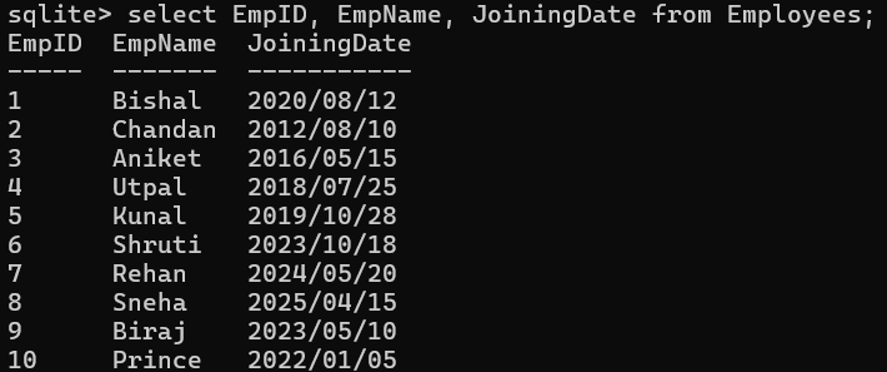
(i) Display employee ID, employee name and joining date of employees .
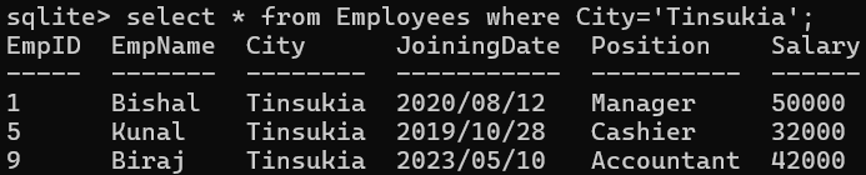
(ii) Fetch details of employees with city column value as ‘Tinsukia’.
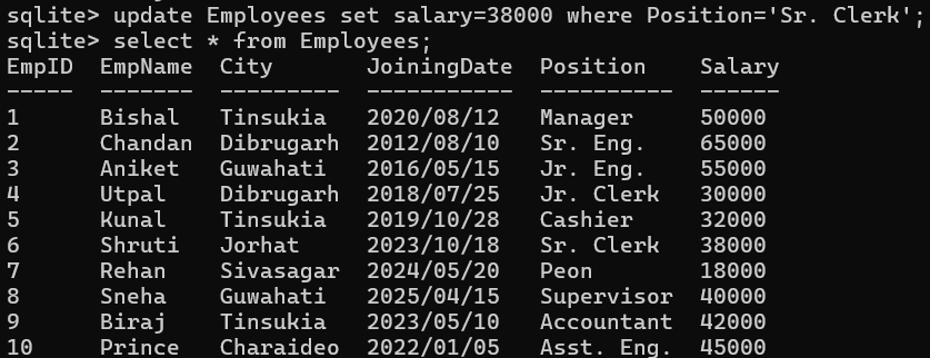
(iii) Change the value of salary column to 38000 where the position column has the value ‘Sr. Clerk’.
(iv) Change the table name Employees to EmployeeDetails.

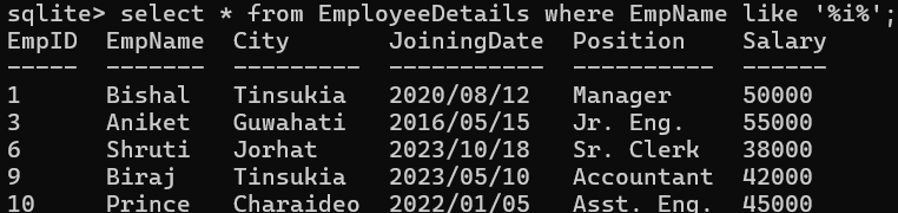
(v) Select all the records where the value of employee name containing the letter ‘i’.
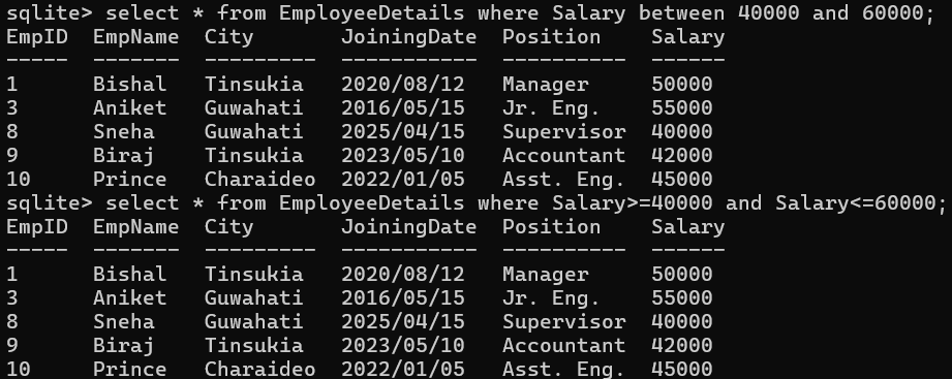
(vi) Select all the records where the value of salary is in range 40000 and 60000.
(vii) Display the total salaries payable to employees.

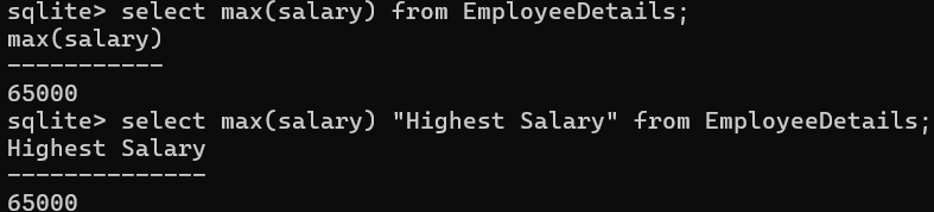
(viii) Display highest salary from the table.
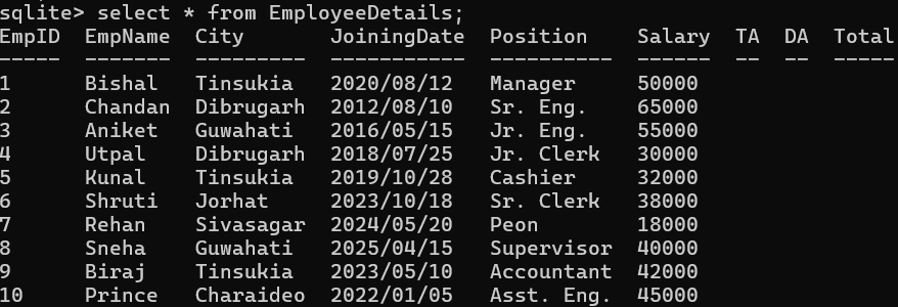
(ix) Add three columns to the table as i) TA ii) DA and iii) Total

(x) Set the value of TA as 15% of the salary, DA as 12% of the salary and total be sum of salary, TA and DA.

OR

6. Write SQL commands for the following on the basis of table CLUB.
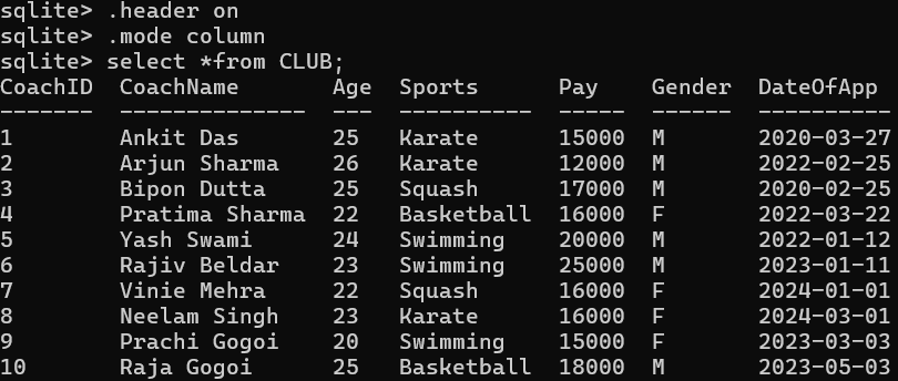
| Coach_ID | CoachName | Age | Sports | Pay | Gender | DateOfApp |
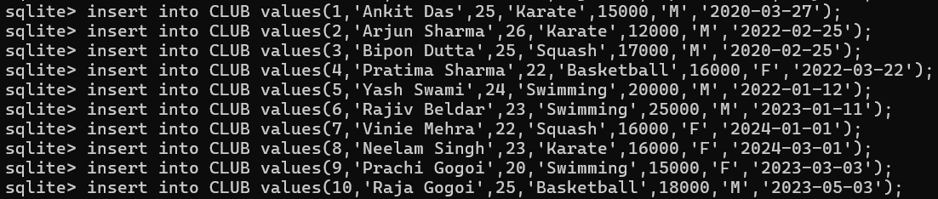
| 1 | Ankit Das | 25 | Karate | 15000 | M | 2020-03-27 |
| 2 | Arjun Sharma | 26 | Karate | 12000 | M | 2022-02-25 |
| 3 | Bipon Dutta | 25 | Squash | 17000 | M | 2020-02-25 |
| 4 | Pratima Sharma | 22 | Basketball | 16000 | F | 2022-03-22 |
| 5 | Yash Swami | 24 | Swimming | 20000 | M | 2022-01-12 |
| 6 | Rajiv Beldar | 23 | Swimming | 25000 | M | 2023-01-11 |
| 7 | Vinie Mehra | 22 | Squash | 16000 | F | 2024-01-01 |
| 8 | Neelam Singh | 23 | Karate | 16000 | F | 2024-03-01 |
| 9 | Prachi Gogoi | 20 | Swimming | 15000 | F | 2023-03-03 |
| 10 | Raja Gogoi | 25 | Basketball | 18000 | M | 2023-05-03 |
create table CLUB(CoachID int, CoachName text, Age int, Sports text, Pay int, Gender text, DateOfApp date);
(i) Show all information about the swimming coaches in the club.

(ii) Display the different sports offered in the club.

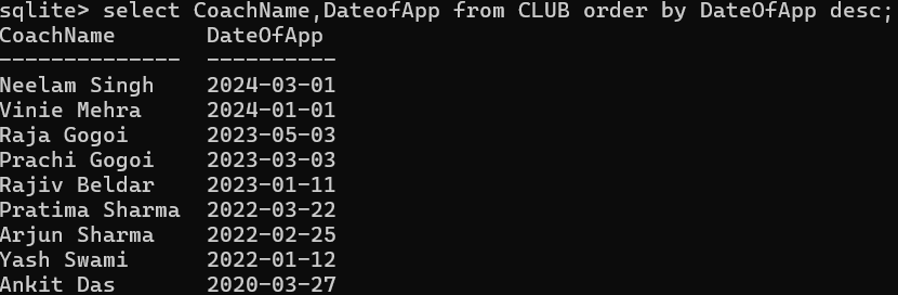
(iii) List the name of all coaches with their date of appointment. Date of appointment is in descending order.
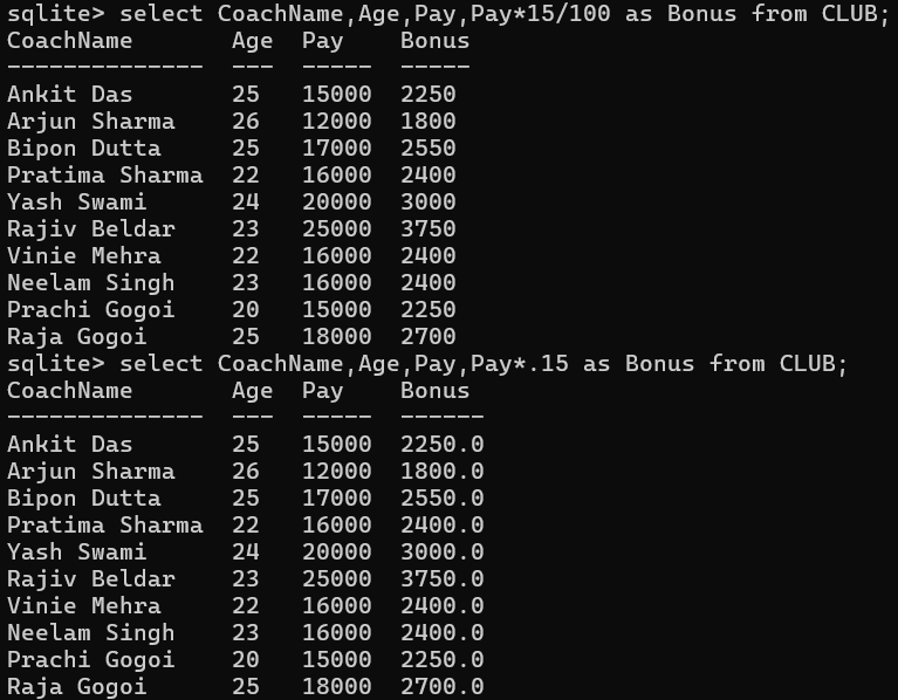
(iv) Display a report showing coach name, age, pay and bonus (15% of pay) of all the coaches.
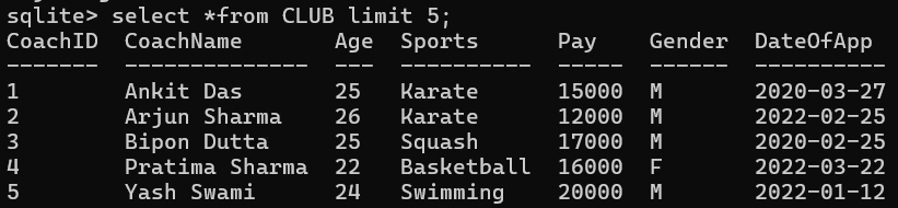
(v) Display first 5 records of coaches from the table-CLUB.
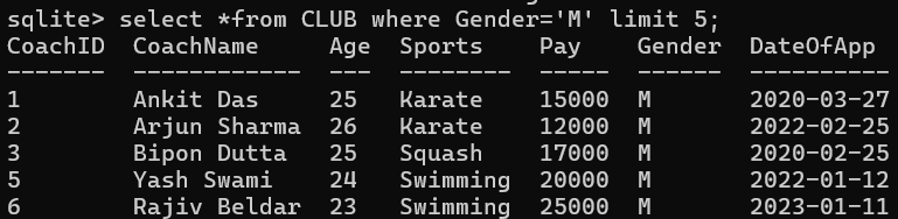
(vi) Display first 5 records of Male coaches from the table-CLUB.
(vii) Display 3 records starting from 5th records from the table-CLUB.

(viii) Display 5 records skipping the first 2 records.
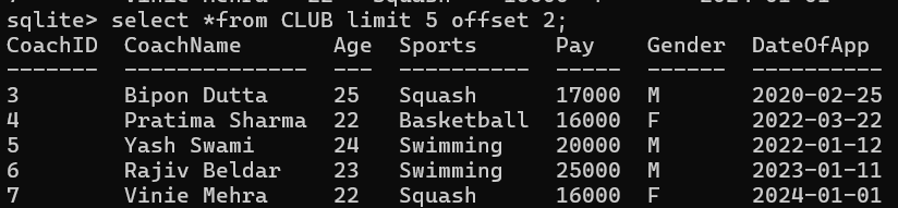
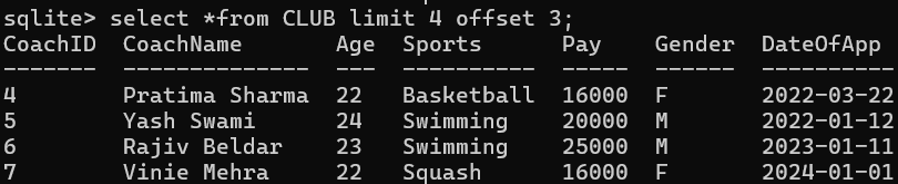
(ix) Display details of coaches from records 4 to 7.
(x) Display the records of top 5 coaches who are getting highest payment.
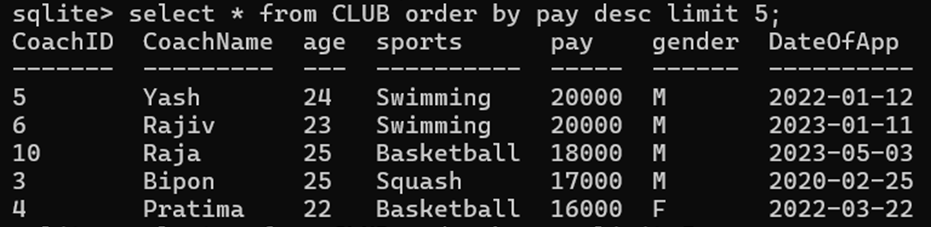
(xi) Show the details of coach who are getting 2nd highest payment.

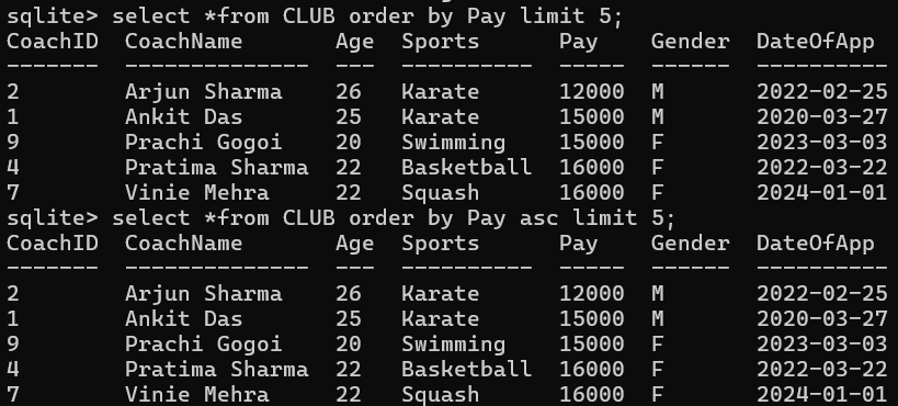
(xii) Display the records of 5 coaches who are getting lowest payment.
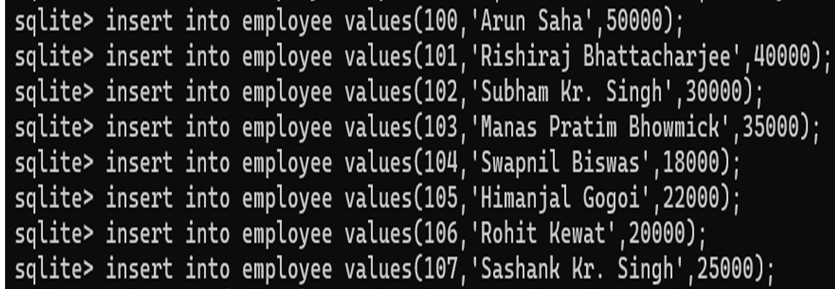
7. Write SQL commands for the following on the basis of the table employee.
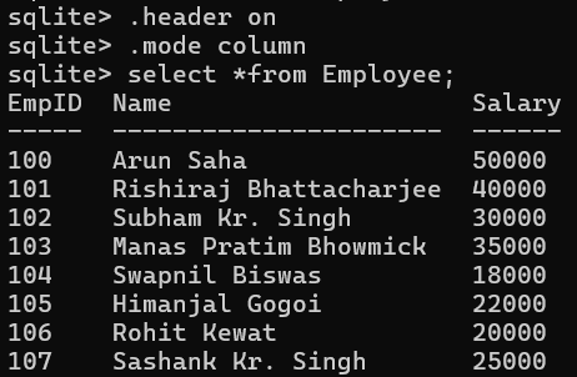
| EmpID | Name | Salary |
| 100 | Arun Saha | 50000 |
| 101 | Rishiraj Bhattacharjee | 40000 |
| 102 | Subham Kr. Singh | 30000 |
| 103 | Manas Pratim Bhowmick | 35000 |
| 104 | Swapnil Biswas | 18000 |
| 105 | Himanjal Gogoi | 22000 |
| 106 | Rohit Kewat | 20000 |
| 107 | Sashank Kr. Singh | 25000 |
create table employee(EmpID int, Name text, Salary int);
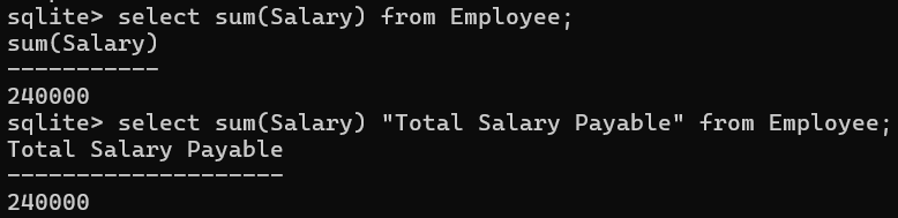
(i) Write a query to get the total salaries payable to employees.
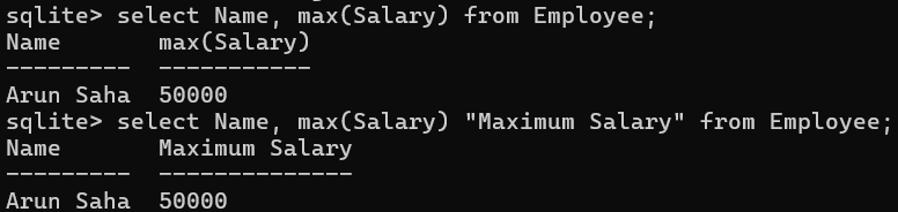
(ii) Write a query to find the name of the employee who earn the maximum salary. Return employee name and maximum salary.
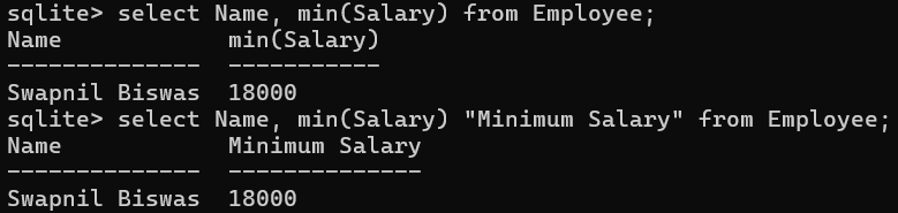
(iii) Write a query to get the name of the employee who draws minimum salary. Display name of employee and minimum salary.
(iv) Write a query to get the average salary payable to employees and number of employees in the employee table.

(v) Write a query to get the highest, lowest, sum and average salary of all employees.

(vi) Write a query to get the number of employees working with the company.

(vii) Find how many employees getting salary more than or equal to 40000.

(viii) Display the difference between the highest and lowest salaries of employees.

(ix) Add four columns to the table Employee as TA, DA, HRA and Total.
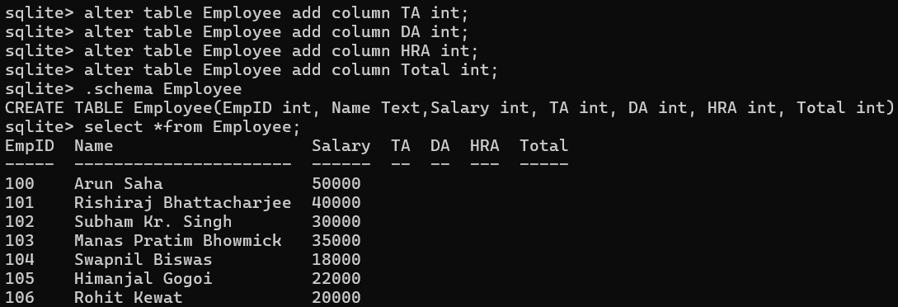
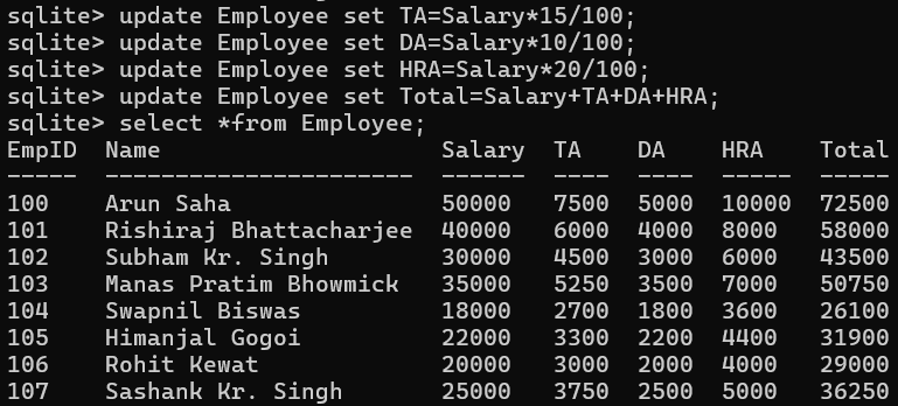
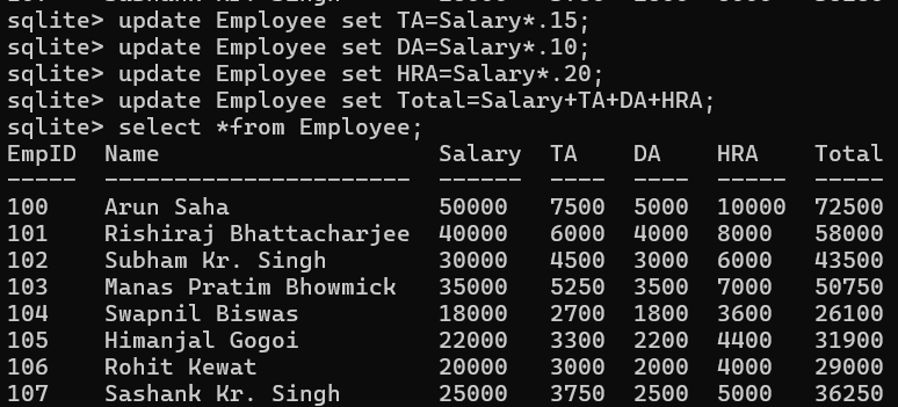
(x) Set the value TA as 15% of the salary, DA as 10% of the salary, HRA as 20% of the salary and total be sum of salary, TA, DA and HRA.
OR
8. Create the following table EmpDetail and insert the data into the table.
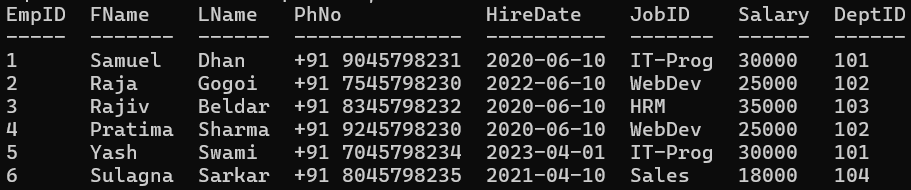
| EmpID | FName | LName | PhNo | HireDate | JobID | Salary | DeptID |
| 1 | Samuel | Dhan | +91 9045798231 | 2020-06-10 | IT-Prog | 30000 | 101 |
| 2 | Raja | Gogoi | +91 7545798230 | 2022-06-10 | WebDev | 25000 | 102 |
| 3 | Rajiv | Beldar | +91 8345798232 | 2020-06-10 | HRM | 35000 | 103 |
| 4 | Pratima | Sharma | +91 9245798230 | 2020-06-10 | WebDev | 25000 | 102 |
| 5 | Yash | Swami | +91 7045798234 | 2023-06-10 | IT-Prog | 30000 | 101 |
| 6 | Sulagna | Sarkar | +91 8045798235 | 2021-06-10 | Sales | 18000 | 104 |
create table EmpDetail(EmpID int, FName text, LName text, PhNo text, HireDate date, JobID text, Salary int, DeptID int);

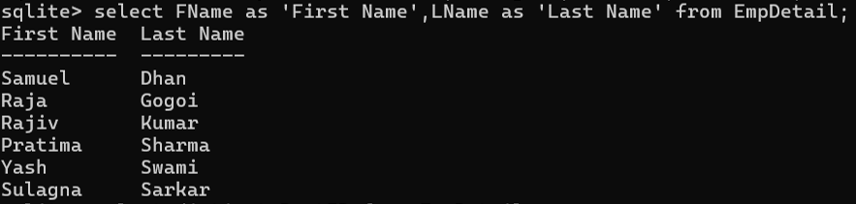
(i) Write a query to display the names (FName, LName) using alias name “First Name”, “Last Name”.
(ii) Write a query to get unique department id from the EmpDetail table.

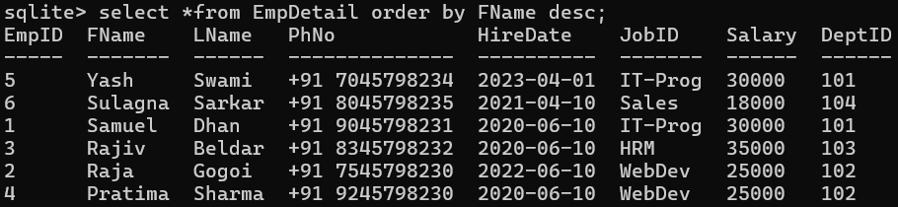
(iii) Write a query to get all employee details, display first name in descending order.
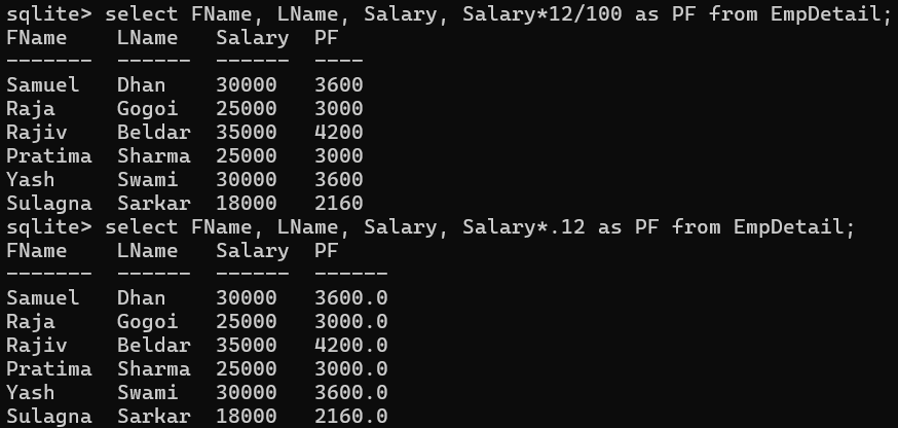
(iv) Write a query to get the names (first name, last name), salary, PF of all the employees. (PF is calculated as 12% of salary)
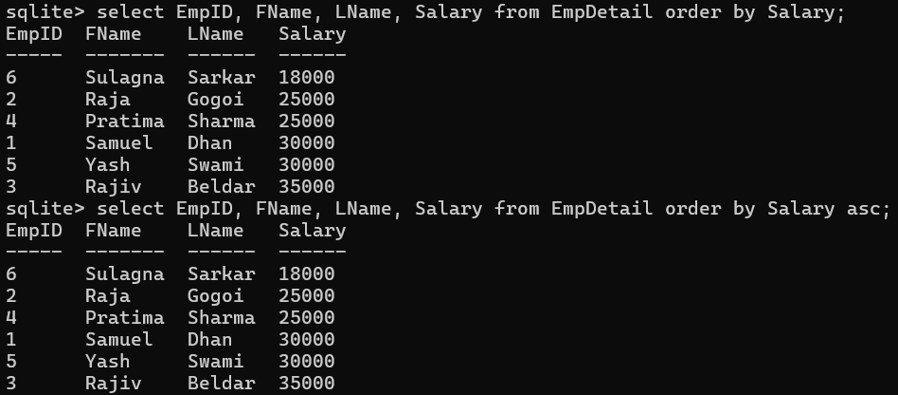
(v) Write a query to get the employee id, names (FName, LName) and salary from the EmpDetail table, salary would be in ascending order.
(vi) Write a query to get the total salary payable to Web Devloper.

(vii) Write a query to get the number of employees working with the company who is working as ‘IT_Prog’.

(viii) Write a query to get the number of jobs available in the EmpDetail table.

(ix) Write a query to get all first name from EmpDetail table in Upper case.
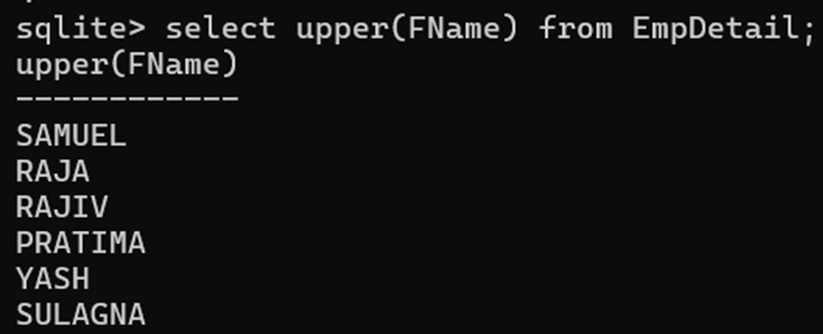
(x) Write a query to get the first three characters of first name from EmpDetail table.

9. Write SQL commands for the following on the basis of ‘marks’ table.
| RollNo | Subject | Marks |
| 1 | English | 90 |
| 2 | English | 60 |
| 3 | English | 80 |
| 1 | Math | 80 |
| 2 | Math | 80 |
| 3 | Math | 65 |
| 1 | Science | 70 |
| 2 | Science | 50 |
| 3 | Science | 85 |
create table marks(RollNo int, Subject text, Marks int);

(i) Display roll number and total marks of each student from marks table.

(ii) Display the average marks of each student.


(iii) Display roll number, subject and maximum marks of each student.

(iv) Display roll number subject and minimum marks of each student.

(v) Display roll number and total marks of each student where total marks is less than 200.

(vi) Find the highest marks of each subject. Return subject and highest marks.

(vii) Display roll number and percentage of each student.

(viii) Display roll number and total marks of each student and sort it on the basis of total marks.

(ix) Display roll number and the number of subjects enrolled by each student.

(x) Display the subjects with maximum marks of each student where maximum marks is greater than 80.

10. Create a table ‘EMP’, insert data and write SQL commands for the following.
| emp_id | dept_id | name | city | salary |
| 1 | 104 | Sajid | Guwahati | 70000 |
| 2 | 104 | Ashish | Dibrugarh | 40000 |
| 3 | 101 | Sweety | Tinsukia | 50000 |
| 4 | 103 | Arjun | Guwahati | 55000 |
| 5 | 101 | Dhiraj | Dibrugarh | 75000 |
| 6 | 104 | Bishal | Dibrugarh | 60000 |
| 7 | 103 | Rohit | Jorhat | 55000 |
| 8 | 102 | Shruti | Dibrugarh | 50000 |
| 9 | 101 | Ganesh | Tinsukia | 55000 |
| 10 | 102 | Nitul | Tinsukia | 40000 |
create table employee(emp_id int, dept_id int, name text, city text, salary int);
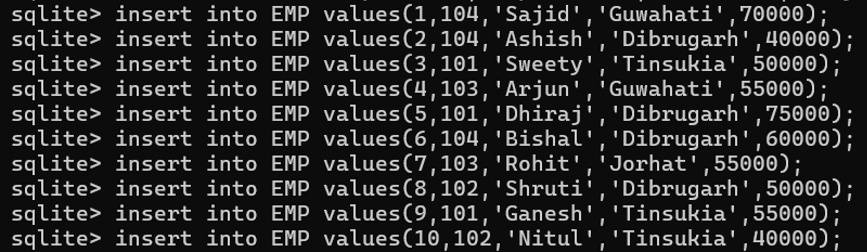
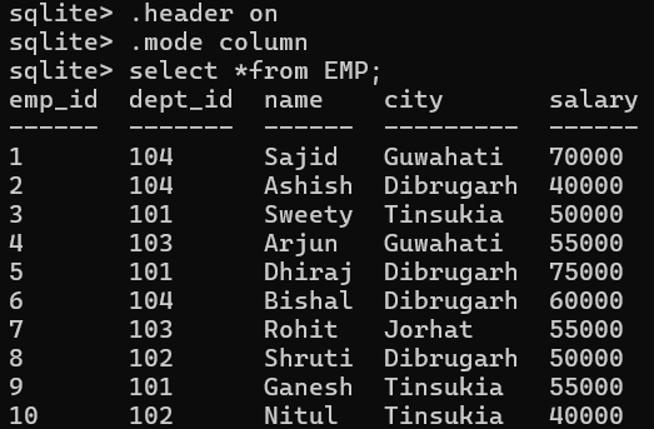
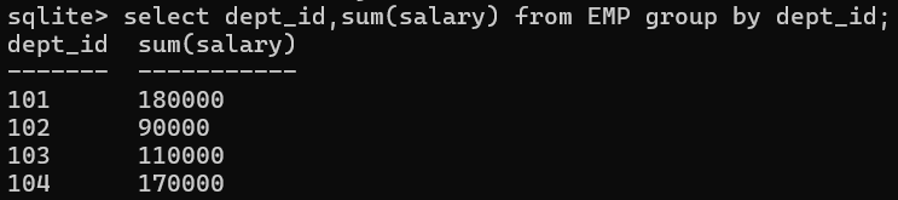
(i) Display department id and total salary payable to employees of each department.
(ii) Display department id and number of employees from each department.
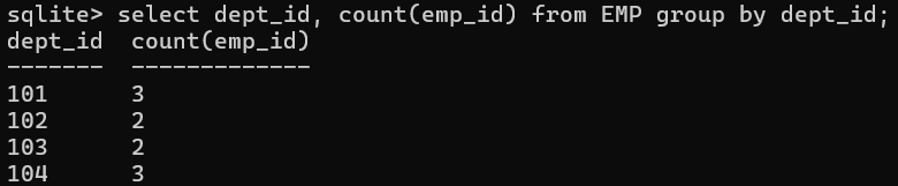
(iii) Display dept_id and maximum salary for each department with the name of employee.
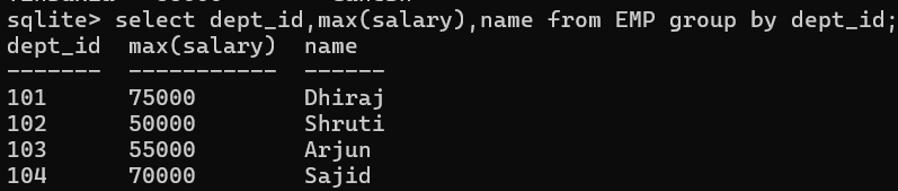
(iv) Show the city, the highest salary in that city, and the names of employees who earn that salary.
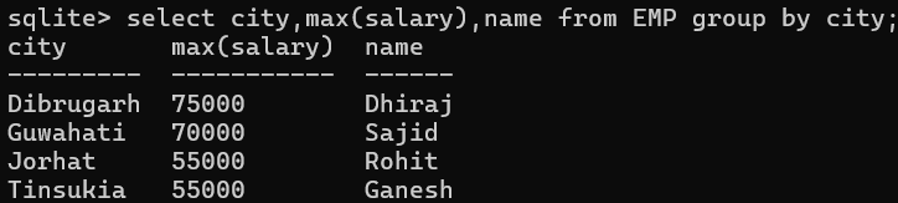
(v) Display the dept_id, total, average, maximum and minimum salary for each department’s employees.


(vi) Display dept_id, maximum salary for each department with “dept_id” greater than 102.

(vii) Display the city and number of employees from each city.

(viii) Display the number of employees who are earning salary greater than 55000.

(ix) Write a query to get the employee name and maximum salary who are from Tinsukia City.

(x) Display dept_id and maximum salary for each department with the name of employee whose maximum salary is greater than 60000.

11. Create table EmpData and insert the data in the table.
| emp_id | emp_name | working_date | working_hours |
| 1 | Kunal | 2020-01-20 | 10 |
| 2 | Arnav | 2020-01-20 | 8 |
| 3 | Rahul | 2020-01-20 | 10 |
| 4 | Binoy | 2020-01-20 | 6 |
| 1 | Kunal | 2020-01-21 | 12 |
| 2 | Arnav | 2020-01-21 | 10 |
| 4 | Binoy | 2020-01-21 | 8 |
| 3 | Rahul | 2020-01-21 | 6 |
| 1 | Kunal | 2020-01-22 | 8 |
| 2 | Arnav | 2020-01-22 | 10 |
create table EmpData(emp_id int, emp_name text, working_date date, working_hours int);
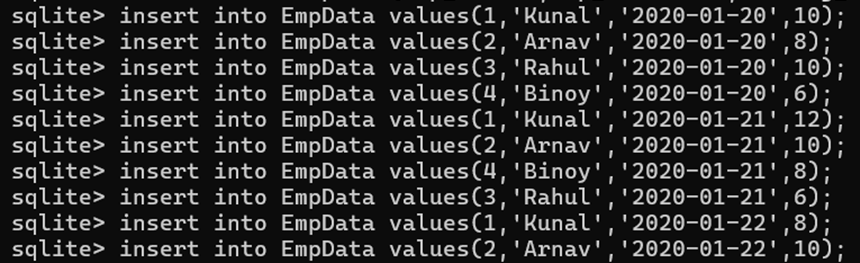
(i) Display employee id, sum and average working hours grouped on the employee id.

(ii) Display employee name, total working hours of each employee and sort it in the descending order of the sum of working hours.

(iii) Display employee name and total working hours of each employee, where total working hours is greater than 20.

(iv) Display only the name of employees whose maximum working hours is greater than or equal to 10.

(v) Write a SQL query to find the highest working hours of each employee. Return employee name and highest working hours.

12. Create the following table ‘Customer’ and insert data into the table.
| cust_id | cust_name | city | grade |
| 1002 | Dipannita Paul | Tinsukia | 100 |
| 1007 | Rishi Das | Tinsukia | 200 |
| 1005 | Priya Baruah | Sivasagar | 300 |
| 1008 | Amit Kumar | Dibrugarh | 200 |
| 1004 | Sajid Ahmed | Guwahati | 400 |
| 1009 | Priya Sharma | Dibrugarh | 500 |
| 1003 | Yashmin Ahmed | Jorhat | 100 |
| 1001 | Rubi Dutta | Tinsukia | 200 |
| 1006 | Minakshi Phukon | Sivasagar | 300 |
create table Customer(cust_id int, cust_name text, city text, grade int);

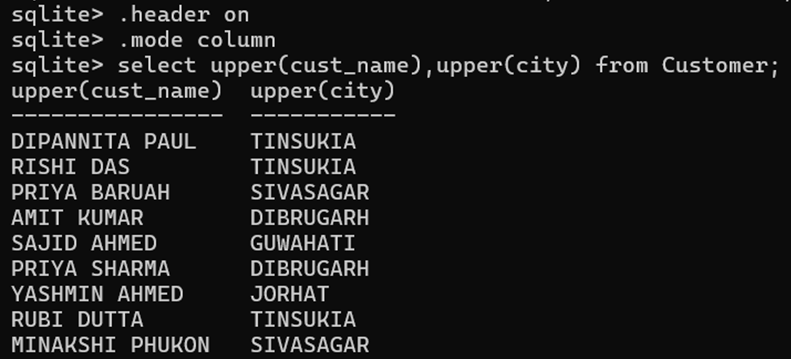
(i) Display the customer’s name and city in uppercase letters.
(ii) Display the name of employees with name starting with the letter R.

(iii) Find the highest and lowest grade of the customers in each city. Display city, maximum grade and minimum grade.

(iv) Display only those cities whose maximum grade is greater than 300.

(v) Display the name of cities where city count is greater than or equal to 2.

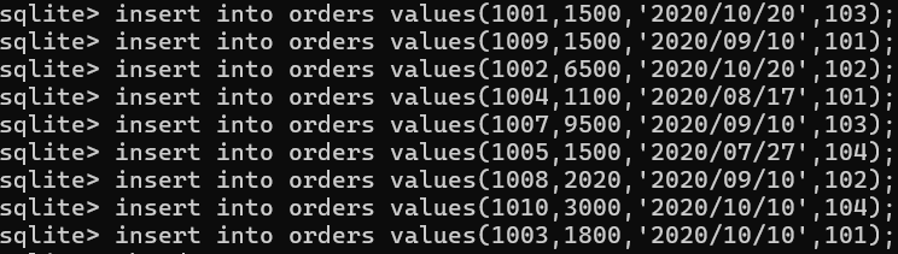
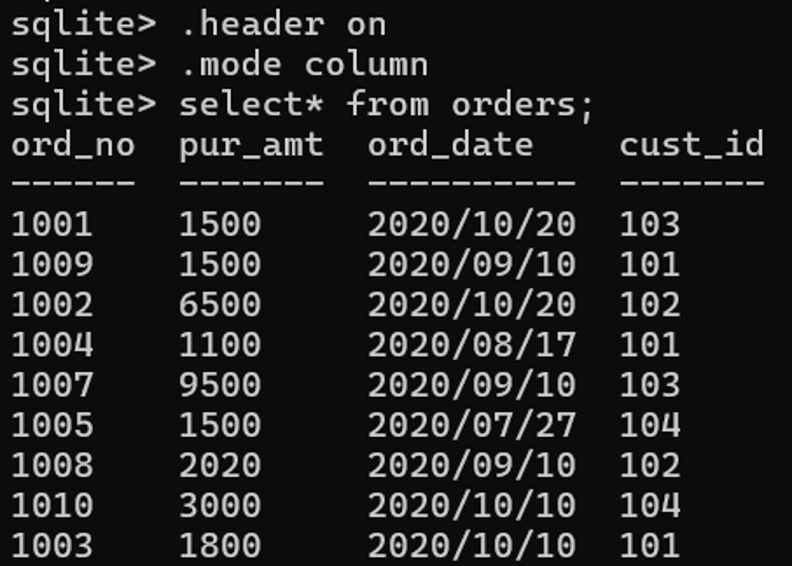
13. Create the table “orders” and add the records in the table.
| ord_no | pur_amt | ord_date | cust_id |
| 1001 | 1500 | 2020/10/20 | 103 |
| 1009 | 1500 | 2020/09/10 | 101 |
| 1002 | 6500 | 2020/10/20 | 102 |
| 1004 | 1100 | 2020/08/17 | 101 |
| 1007 | 9500 | 2020/09/10 | 103 |
| 1005 | 1500 | 2020/07/27 | 104 |
| 1008 | 2020 | 2020/09/10 | 102 |
| 1010 | 3000 | 2020/10/10 | 104 |
| 1003 | 1800 | 2020/10/10 | 101 |
create table orders(ord_no int, pur_amt int, ord_date date, cust_id int);
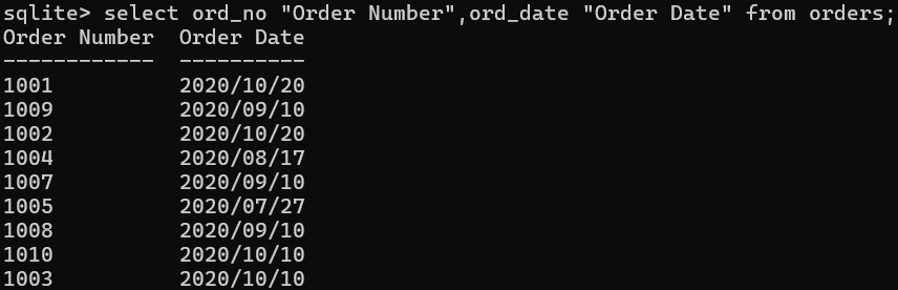
(i) Display ord_no and ord_date with column heading, “Order Number” and “Order Date”.
(ii) Find the number of orders given by each customer. Display customer id and number of orders.
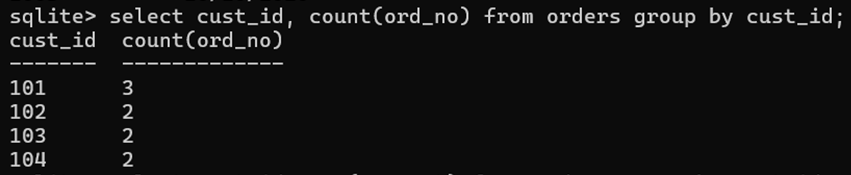
(iii) Display customer id and the highest purchase amount ordered by each customer.
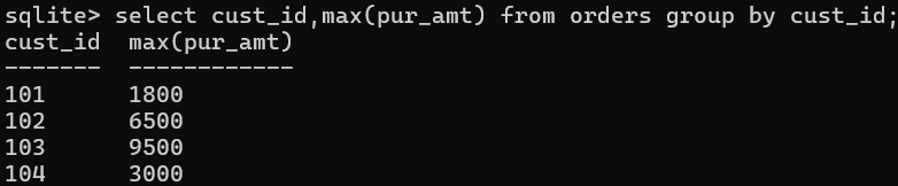
(iv) Show the customer id and total purchase amount of each customer. Total purchase amount should be in ascending order.

(v) Display order date, sum and average purchase amount grouped on the order date.

14. Answer the following:
(i) Create a table “EMP” with the following columns:
EMP_NO, EMP_NAME, JOIN_DATE, JOIN_BASIC
create table EMP(EMP_NO int, EMP_NAME text, JOIN_DATE date, JOIN_BASIC int);
(ii) Insert the data:
| EMP_NO | EMP_NAME | JOIN_DATE | JOIN_BASIC |
| 1001 | Rishi Das | 2022-06-01 | 30000 |
| 1002 | Bibek Das | 2022-06-01 | 25000 |
| 1003 | Kunal Karmakar | 2022-06-01 | 30000 |
| 1004 | Arnav Dutta | 2022-07-01 | 25000 |
| 1005 | Roktim Gogoi | 2022-07-01 | 28000 |

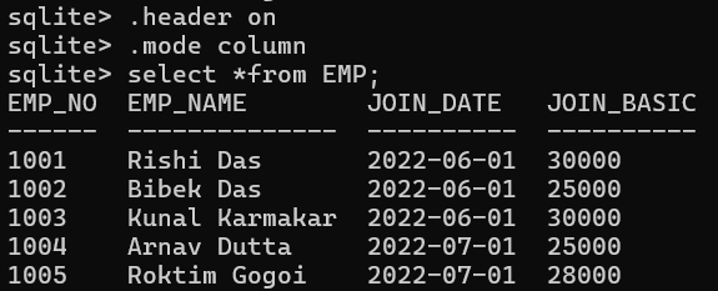
(iii) Display employee number and employee name from the above table with column heading “Employee Number” and “Employee Name”.

(iv) Display the name of employees with names starting with the letter, R.

(v) To the table EMP, add a new column, DESIG.
alter table EMP add column DESIG text;
(vi) Update the table and add data to DESIG column.
| EMP_NO | DESIG |
| 1001 | EXE |
| 1002 | DIR |
| 1003 | DIR |
| 1004 | MGR |
| 1005 | MGR |

(vii) Display the different designation of EMP table.

(viii) Retrieve the records of employees whose designation is not DIR or MGR.

(ix) List out the employees whose designation is “MGR” and getting join basic more than 25000.

(x) List out the designation wise maximum join basic of the employees. Return employee name, designation and maximum join basic.

15. Answer the following-
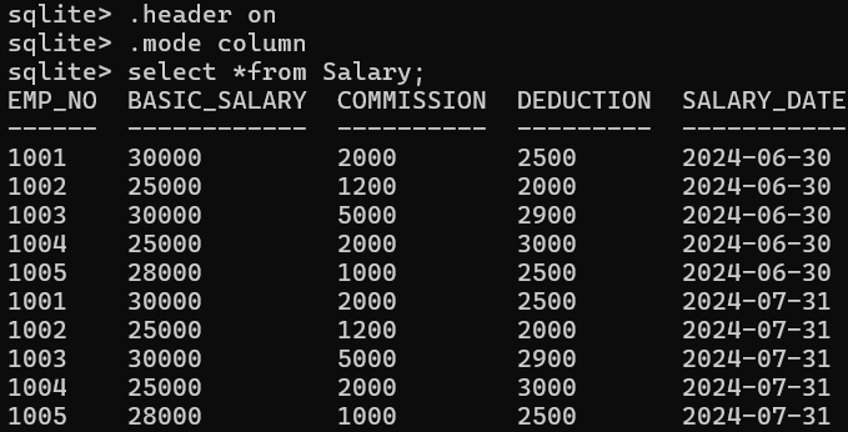
(i) Create a table “Salary” with the following columns:
EMP_NO, BASIC_SALARY, COMMISSION, DEDUCTION, SALARY_DATE
create table Salary(EMP_NO int, BASIC_SALARY int, COMMISSION int, DEDUCTION int, SALARY_DATE date);
(ii) Insert the following data into the “Salary” table.
| EMP_NO | BASIC_SALARY | COMMISSION | DEDUCTION | SALARY_DATE |
| 1001 | 30000 | 2000 | 2500 | 2024-06-30 |
| 1002 | 25000 | 1200 | 2000 | 2024-06-30 |
| 1003 | 30000 | 5000 | 2900 | 2024-06-30 |
| 1004 | 25000 | 2000 | 3000 | 2024-06-30 |
| 1005 | 28000 | 1000 | 2500 | 2024-06-30 |
| 1001 | 30000 | 2000 | 2500 | 2024-07-31 |
| 1002 | 25000 | 1200 | 2000 | 2024-07-31 |
| 1003 | 30000 | 5000 | 2900 | 2024-07-31 |
| 1004 | 25000 | 2000 | 3000 | 2024-07-31 |
| 1005 | 28000 | 1000 | 2500 | 2024-07-31 |
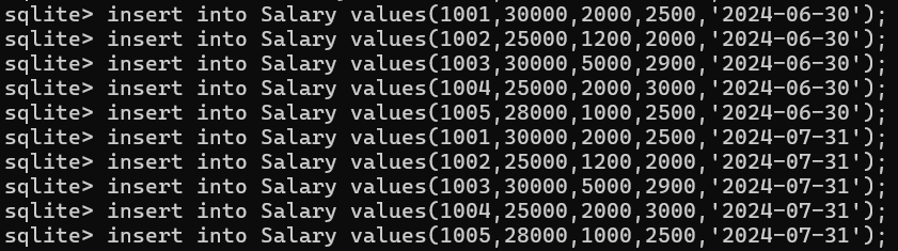
(iii) Display emp_no, basic salary, commission, deduction and net salary, sort net salary in descending order. Net salary is calculated as follows:
NET SALARY = BASIC_SALARY + COMMISSION – DEDUCTION

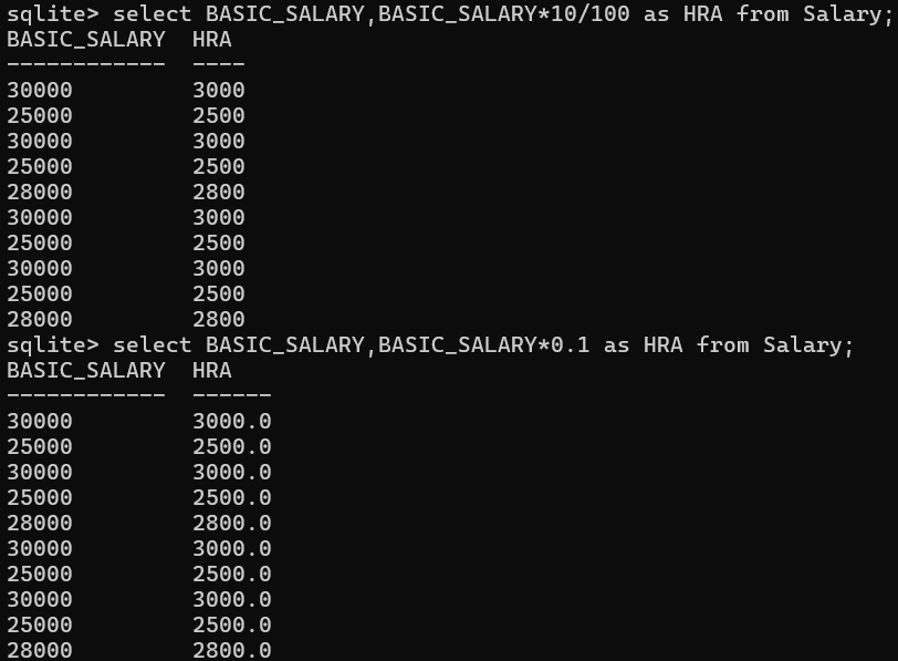
(iv) Display the basic salary and HRA, HRA is calculated as 10% of basic salary.
(v) Display the emp_no, basic salary and commission of employees whose basic salary + commission is greater than 30000.

(vi) Display employee number and total basic salary of each employee and sort it in the descending order of total of basic salary.

(vii) Display the employee number and average basic salary of those employees whose average basic is greater than 20000.

(viii) To the table Salary, add a new column, DEPARTMENT.
alter table Salary add column DEPARTMENT text;
(ix) Update the table with department set to SLS, ACC, MKT
| EMP_NO | DEPARTMENT |
| 1001 | ACC |
| 1002 | SLS |
| 1003 | SLS |
| 1004 | MKT |
| 1005 | MKT |

(x) Display the department and sum, average, maximum, minimum basic salary of each department.

“Well explained, made the topic much easier to understand!”
Thank you…Feel free to give feedback…
Helpfull
Thank You for your comments…