1. Create a webpage in HTML which has college name as heading and add relevant text regarding it.
SOLUTION
<!DOCTYPE HTML>
<HTML>
<HEAD>
<TITLE>Tinsukia College</TITLE>
</HEAD>
<BODY>
<H1>TINSUKIA COLLEGE</H1>
<P ALIGN=”JUSTIFY”>Tinsukia College, established in 1956, is one of the oldest undergraduate, coeducational college situated in Tinsukia, Assam. This college is affiliated with the Dibrugarh University. Tinsukia College, an institution that initiated its academic endeavour with a handful of students and four faculty members now has grown into a huge family with an enrolment of more than 3500 students and a teaching fraternity with almost 80 members contributing to the growth of this premier institution of higher education. This Co-ed institution has been imparting education both at Higher Secondary & Degree levels in 5 faculties of Arts, Science, Commerce, Management and Computer Science. Currently, the college has altogether 17 departments, viz. Assamese, Bengali, Botany, Chemistry, Commerce, Computer Science, Economics, English, Geography, Hindi, History, Mathematics, Philosophy, Physics, Political Science, Statistics and Zoology. Except Bengali and Computer Science all the other departments offer Honours courses at the degree level. Besides, it provides two professional degree courses, viz, BBA and BCA. The college has a study centre of Krishna Kanta Handique State Open University under which several UG and PG courses are offered.</P>
</BODY>
</HTML>
OUTPUT

2. Create an HTML page with red background, add scrolling text “read the message”.
SOLUTION
<!DOCTYPE HTML>
<HTML>
<HEAD>
<TITLE>Warning!!!</TITLE>
</HEAD>
<BODY BGCOLOR=”RED”>
<MARQUEE BGCOLOR=”WHITE” HEIGHT=”30″ SCROLLAMOUNT=”10″>READ THE MESSAGE</MARQUEE>
<FONT SIZE=”7″>WARNING! </FONT>
</BODY>
</HTML>
OUTPUT

3. Create an HTML file with an attractive background colour that contains the following:
a. Title should be “About My City”
b. Place your city name at the top of the page with bold, italic as a heading in blue colour.
c. A paragraph about your city. Font should be arial.
SOLUTION
<!DOCTYPE HTML>
<HTML>
<HEAD>
<TITLE>About My City</TITLE>
</HEAD>
<BODY BGCOLOR=”CYAN”>
<FONT COLOR=”BLUE”>
<H1 ALIGN=”CENTER”><I><U>TINSUKIA</U></I></H1>
</FONT>
<FONT FACE=”ARIAL”>
<P ALIGN=”JUSTIFY”> Tinsukia is located in the upper part of Assam and is surrounded by Arunachal Pradesh in the south-east, Dibrugarh district in the south-west and Dhemaji district in the north. Tinsukia has a geographical area of 3790 sq. km. It was declared as the 23rd district of Assam on 1st October 1989 with three sub divisions Tinsukia, Margherita (M), and Sadiya. The ancient name of Tinsukia was Bangmara which was originally known as Changmai Pathar. It was the capital of Muttack Kingdom. The district is inhabited by various communities mainly Moran, Matak, Adivasi, Tai Ahom, Sonowal Kachari, Nepali, Singpho, Bengali, Marwari and Bihari.</P>
</BODY>
</HTML>
OUTPUT

4. Create a web page of your college with the following specifications –
a. Title should be about my college
b. Place your College name at the top of the page in large text followed by address in smaller size.
c. Write a paragraph about your college.
d. Add names of courses offered each in a different color and styles.
e. Add college image in the page.
SOLUTION
<!DOCTYPE HTML>
<HTML>
<HEAD>
<TITLE>About My College</TITLE>
</HEAD>
<BODY>
<H1 ALIGN=”CENTER”>TINSUKIA COLLEGE</H1>
<H2 ALIGN=”CENTER”>Kachujan</H2>
<H2 ALIGN=”CENTER”>Tinsukia, Assam</H2>
<H2 ALIGN=”CENTER”>786125</H2>
<FONT SIZE=”4″>
<P ALIGN=”JUSTIFY”>Tinsukia College, established in 1956, is one of the oldest undergraduate, coeducational college situated in Tinsukia, Assam. This college is affiliated with the Dibrugarh University. Tinsukia College, an institution that initiated its academic endeavour with a handful of students and four faculty members now has grown into a huge family with an enrolment of more than 3500 students and a teaching fraternity with almost 80 members contributing to the growth of this premier institution of higher education. This Co-ed institution has been imparting education both at Higher Secondary & Degree levels in 5 faculties of Arts, Science, Commerce, Management and Computer Science. Currently, the college has altogether 17 departments, viz. Assamese, Bengali, Botany, Chemistry, Commerce, Computer Science, Economics, English, Geography, Hindi, History, Mathematics, Philosophy, Physics, Political Science, Statistics and Zoology. Except Bengali and Computer Science all the other departments offer Honours courses at the degree level. Besides, it provides two professional degree courses, viz, BBA and BCA. The college has a study centre of Krishna Kanta Handique State Open University under which several UG and PG courses are offered.</P> </FONT>
<IMG SRC=”D:\tsk.webp” ALIGN=”RIGHT” HEIGHT=”600″ WIDTH=”1000″ vspace=”50″>
<H2><U><I>Courses Offered in the College:</I></U> </H2>
<FONT SIZE=”5″ COLOR=”BLUE” FACE=”VERDANA”>
<UL type=”square”>
<LI>Undergraduate Programs:</LI>
<UL>
<LI>BA</LI>
<LI>BSc</LI>
<LI>BCom</LI>
<LI>BCA</LI>
<LI>BBA</LI>
</UL>
</FONT>
<FONT SIZE=”5″ COLOR=”GREEN” FACE=”ARIAL”>
<LI>Post Graduate Programs:</LI>
<UL>
<LI>MA</LI>
<LI>MSc</LI>
<LI>MCom</LI>
</UL>
</FONT>
<FONT SIZE=”5″ COLOR=”PURPLE” FACE=”CONSOLAS”>
<LI>Higher Secondary Courses:
<UL>
<LI>11th</LI>
<LI>12th</LI>
</UL>
</FONT>
<FONT SIZE=”5″ COLOR=”BROWN” FACE=”COOPER”>
<LI>Distance Education Courses:</LI>
<UL>
<LI>BA</LI>
<LI>BCom</LI>
<LI>BCA</LI>
<LI>BPP</LI>
<LI>MA</LI>
<LI>MSW</LI>
</UL>
</FONT>
</UL>
</BODY>
</HTML>
OUTPUT


5. Write HTML code to generate following output.
- Coffee
- Hot Coffee
- Cold Coffee
- Tea
- Black Tea
- Green Tea
- Milk
- Paneer
- Ghee
- Ice Cream
SOLUTION
<!DOCTYPE HTML>
<HTML>
<HEAD>
<TITLE>Nesting Lists</TITLE>
</HEAD>
<BODY>
<UL>
<LI>Coffee</LI>
<UL>
<LI>Hot Coffee</LI>
<LI>Cold Coffee</LI>
</UL>
<LI>Tea</LI>
<UL>
<LI>Black Tea</LI>
<LI>Green Tea</LI>
</UL>
<LI>Milk</LI>
<UL>
<LI>Paneer</LI>
<LI>Ghee</LI>
<LI>Ice Cream</LI>
</UL>
</UL>
</BODY>
</HTML>
OUTPUT

6. Design a web page with an attractive background colour including the following:
a. A paragraph with a heading. Use italics and underline in heading. Also use different font styles and color in heading and paragraph. Paragraph font size should be 5.
b. Add a horizontal line after heading. Use two attributes also.
c. Insert a picture on right side of the web page.
SOLUTION
<!DOCTYPE HTML>
<HTML>
<HEAD>
<TITLE>HTML Introduction</TITLE>
</HEAD>
<BODY BGCOLOR=”HOTPINK”>
<FONT COLOR=”BLUE” FACE=”HARRINGTON”>
<H1><I><U>INTRODUCTION TO HTML</U></I></H1></FONT>
<HR SIZE=”5″ COLOR=”CYAN”>
<FONT SIZE=”5″ COLOR=”YELLOW” FACE=”MONOTYPE CORSIVA”>
<P ALIGN=”JUSTIFY”>HTML, which stands for HyperText Markup Language, is the standard language for creating web pages. It provides the structure and content of a website, defining how text, images, and other elements are displayed in a web browser. While HTML primarily handles structure, it’s often used with CSS for styling and JavaScript for interactivity.HTML is not a programming language; it’s a markup language. This means it uses tags to annotate text and other content, telling the browser how to interpret and display it.HTML defines the structure of a webpage, including headings, paragraphs, lists, images, links, and more. Web browsers read HTML code and render it as a visual webpage, interpreting the tags to determine how to display the content. A typical HTML document includes an <html> tag, a <head> section (for metadata like the title), and a <body> section. The current standard for HTML is HTML5, which includes new elements and features to enhance web development.</P>
<IMG SRC=”D:\Pictures\Hyderabad.jpg” ALIGN=”RIGHT” HEIGHT=”400″ WIDTH=”600″>
</BODY>
</HTML>
OUTPUT

7. Create a nested list as follows:
Computer System
- Input Devices
- Keyboard
- Mouse
- Joystick
- Scanner
- Output Devices
- Monitor
- Printer
Apply following parts:
- Display a marquee “Input and Output devices” at the top of the page.
- Use bold, italics and underline in heading.
SOLUTION
<!DOCTYPE html>
<HTML>
<HEAD>
<TITLE>Nested List</TITLE>
</HEAD>
<BODY>
<MARQUEE SCROLLAMOUNT=”10″ BEHAVIOR=”ALTERNATE” BGCOLOR=”YELLOW”>Input and Output devices</MARQUEE>
<H1><B><I><U>Computer System</U></I></B></H1>
<UL TYPE=”SQUARE”>
<LI>Input Devices</LI>
<UL TYPE=”DISC”>
<LI>Keyboard</LI>
<LI>Mouse</LI>
<LI>Joystick</LI>
<LI>Scanner</LI>
</UL>
<LI>Output Devices</LI>
<UL TYPE=”DISC”>
<LI>Monitor</LI>
<LI>Printer</LI>
</UL>
</UL>
</BODY>
</HTML>
OUTPUT

8. Create an HTML file that contains the following:
(i) Insert background image.
(ii) Add a scrolling text at the top of the page.
(iii) Create a link with the with above web (Q1)
(iv) Write HTML code to create a table with the following data-
Student Details
| Name | Roll Number | Address |
| Rahul | 1 | Tinsukia |
| Anjali | 2 | Dibrugarh |
| Sameer | 3 | Chabua |
SOLUTION
<!DOCTYPE HTML>
<HTML>
<HEAD>
<TITLE>Student Details</TITLE>
</HEAD>
<BODY BACKGROUND=”D:\Pictures\Hyderabad.jpg” TEXT=”WHITE” LINK=”YELLOW” ALINK=”GREEN” VLINK=”RED”>
<MARQUEE SCROLLAMOUNT=”10″><FONT SIZE=”6″>WEB PAGE WITH BACKGROUND IMAGE</FONT></MARQUEE><BR><BR>
<A HREF=”D:\HTML\q1.html><FONT SIZE=”4″>CLICK HERE…</FONT></A><BR><BR>
<TABLE BORDER=”2″ BORDERCOLOR=”WHITE” HEIGHT=”300″ WIDTH=”300″ BGCOLOR=”LIGHTGREEN”>
<CAPTION>Student Details</CAPTION>
<THEAD>
<TR>
<TH>Name</TH>
<TH>Roll Number</TH>
<TH>Address</TH>
</TR>
</THEAD>
<TBODY>
<TR>
<TD>Sameer</TD>
<TD>1</TD>
<TD>Tinsukia</TD>
</TR>
<TR>
<TD>Rahul</TD>
<TD>2</TD>
<TD>Dibrugarh</TD>
</TR>
<TR>
<TD>Anjali</TD>
<TD>3</TD>
<TD>Guwahati</TD>
</TR>
</TBODY>
</TABLE>
</BODY>
</HTML>
OUTPUT

9. Write HTML code to generate the following output
Ordered List
- C Programming
- Database Management
- Networking
- Web Technology
- Mobile Technology
- DTP
- HTML
- Java Script
- PHP
SOLUTION
<!DOCTYPE HTML>
<HTML>
<HEAD>
<TITLE>Ordered List</TITLE>
</HEAD>
<BODY>
<H3><U>Ordered List</U></H3>
<OL>
<LI>C Programming</LI>
<LI>Database Management</LI>
<LI>Networking</LI>
</OL>
<OL TYPE=”a”>
<LI>Web Technology</LI>
<LI>Mobile Technology</LI>
<LI>DTP</LI>
</OL>
<OL TYPE=”i”>
<LI>HTML</LI>
<LI>Java Script</LI>
<LI>PHP</LI>
</OL>
</BODY>
</HTML>
OUTPUT

10. Type the paragraph as shown below:
My Hobby
A hobby is any activity that is done regularly in one’s leisure time solely for enjoyment. My hobby is gardening and it is my favourite way to pass time. It mainly consists of preparing the flower beds, sowing the seeds and taking care of the plants as they grow. In this way, I can use my spare time productively and is beneficial for my health. It is the perfect exercise for someone who is not into sports or athletics as gardening involves a lot of physical work like digging and preparing the soil. It is very easy for me to find peace and happiness in my garden.
- Apply block quote on the paragraph.
- Apply text colour to red and change the font style to “monotype corsiva”. Text size should be 5.
- Insert a background image on the page.
- Add a horizontal line after heading.
- Insert an image on the page and align it in right.
- Apply marquee tag on the heading and also use three of its properties.
SOLUTION
<!DOCTYPE HTML>
<HTML>
<HEAD>
<TITLE>My Hobby</TITLE>
</HEAD>
<BODY BACKGROUND=” D:\Pictures\Hyderabad.jpg” TEXT=”WHITE”>
<MARQUEE BGCOLOR=”LIGHTGREEN” DIRECTION=”RIGHT” BEHAVIOR=”ALTERNATE”><H1>My Hobby</H1></MARQUEE>
<HR SIZE=”8″ COLOR=”YELLOW”>
<BLOCKQUOTE><FONT COLOR=”RED” FACE=”MONOTYPE CORSIVA” SIZE=”5″>
<P>A hobby is any activity that is done regularly in one’s leisure time solely for enjoyment. My hobby is gardening and it is my favourite way to pass time. It mainly consists of preparing the flower beds, sowing the seeds and taking care of the plants as they grow. In this way, I can use my spare time productively and is beneficial for my health. It is the perfect exercise for someone who is not into sports or athletics as gardening involves a lot of physical work like digging and preparing the soil. It is very easy for me to find peace and happiness in my garden. </P></FONT></BLOCKQUOTE>
<IMG SRC=”images.jpg” ALIGN=”RIGHT” HEIGHT=”400″ WIDTH=”800″ BORDER=”10″>
</BODY>
</HTML>
OUTPUT

11. Write an HTML code to form a table to show the below values in a tabular form with heading as Roll No., Student name, Subject Name, and values as
1, Ram, Physics
2, Shyam, Math
3, Ajay, Chemistry
SOLUTION
<!DOCTYPE HTML>
<HTML>
<HEAD>
<TITLE>Table</TITLE>
<BODY>
<TABLE>
<THEAD>
<TR>
<TH>Roll No.</TH>
<TH>Student Name</TH>
<TH>Subject Name</TH>
</TR>
</THEAD>
<TBODY>
<TR>
<TD>1</TD>
<TD>Ram</TD>
<TD>Physics</TD>
</TR>
<TR>
<TD>2</TD>
<TD>Shyam</TD>
<TD>Math</TD>
</TR>
<TR>
<TD>3</TD>
<TD>Ajay</TD>
<TD>Chemistry</TD>
</TR>
</TBODY>
</TABLE>
</BODY>
</HTML>
OUTPUT

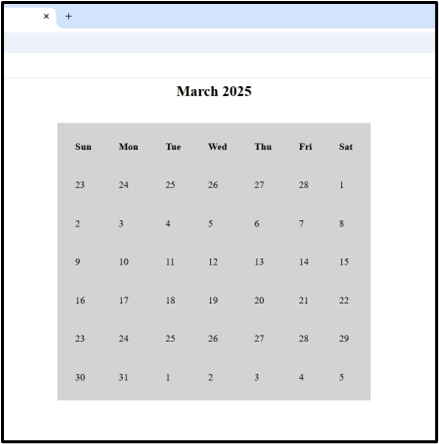
12. Design a calendar using TABLE.
SOLUTION
<!DOCTYPE html>
<html>
<head>
<title>Calendar</title>
<body>
<h2 align=”center”>March 2025</h2>
<br>
<table bgcolor=”lightgrey” align=”center” cellspacing=”15″ cellpadding=”15″>
<thead>
<tr>
<th>Sun</th>
<th>Mon</th>
<th>Tue</th>
<th>Wed</th>
<th>Thu</th>
<th>Fri</th>
<th>Sat</th>
</tr>
</thead>
<tbody>
<tr>
<td>23</td>
<td>24</td>
<td>25</td>
<td>26</td>
<td>27</td>
<td>28</td>
<td>1</td>
</tr>
<tr>
<td>2</td>
<td>3</td>
<td>4</td>
<td>5</td>
<td>6</td>
<td>7</td>
<td>8</td>
</tr>
<tr>
<td>9</td>
<td>10</td>
<td>11</td>
<td>12</td>
<td>13</td>
<td>14</td>
<td>15</td>
</tr>
<tr>
<td>16</td>
<td>17</td>
<td>18</td>
<td>19</td>
<td>20</td>
<td>21</td>
<td>22</td>
</tr>
<tr>
<td>23</td>
<td>24</td>
<td>25</td>
<td>26</td>
<td>27</td>
<td>28</td>
<td>29</td>
</tr>
<tr>
<td>30</td>
<td>31</td>
<td>1</td>
<td>2</td>
<td>3</td>
<td>4</td>
<td>5</td>
</tr>
</tbody>
</table>
</body>
</html>
OUTPUT
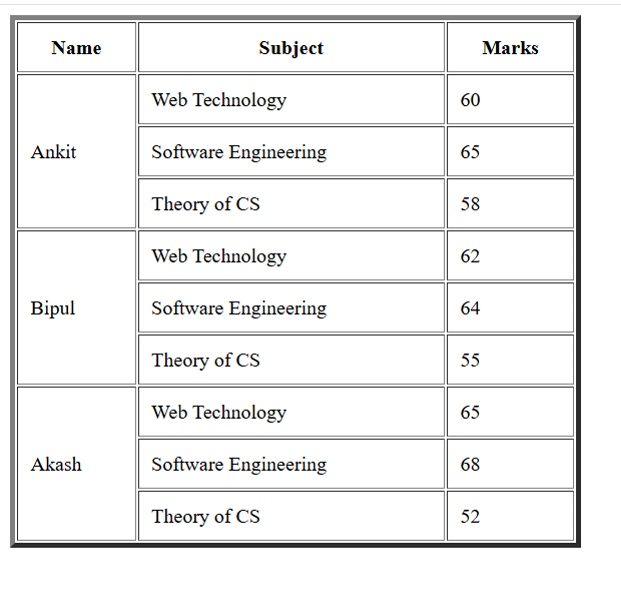
13. Create an HTML file that contains the following table:
| Name | Subject | Marks |
| Ankit | Web Technology | 60 |
| Software Engineering | 65 | |
| Theory Of CS | 58 | |
| Bipul | Web Technology | 62 |
| Software Engineering | 64 | |
| Theory Of CS | 55 | |
| Akash | Web Technology | 65 |
| Software Engineering | 68 | |
| Theory Of CS | 52 |
SOLUTION
<!DOCTYPE HTML>
<HTML>
<HEAD>
<TITLE>Table</TITLE>
<BODY>
<TABLE BORDER=”4″ CELLPADDING=”10″ WIDTH=”30%”>
<THEAD>
<TR>
<TH>Name</TH>
<TH>Subject</TH>
<TH>Marks</TH>
</TR>
</THEAD>
<TBODY>
<TR>
<TD ROWSPAN=”3″>Ankit</TD>
<TD>Web Technology</TD>
<TD>60</TD>
</TR>
<TR>
<TD>Software Engineering</TD>
<TD>65</TD>
</TR>
<TR>
<TD>Theory of CS</TD>
<TD>58</TD>
</TR>
<TR>
<TD ROWSPAN=”3″>Bipul</TD>
<TD>Web Technology</TD>
<TD>62</TD>
</TR>
<TR>
<TD>Software Engineering</TD>
<TD>64</TD>
</TR>
<TR>
<TD>Theory of CS</TD>
<TD>55</TD>
</TR>
<TR>
<TD ROWSPAN=”3″>Akash</TD>
<TD>Web Technology</TD>
<TD>65</TD>
</TR>
<TR>
<TD>Software Engineering</TD>
<TD>68</TD>
</TR>
<TR>
<TD>Theory of CS</TD>
<TD>52</TD>
</TR>
</TBODY>
</TABLE>
</BODY>
</HTML>
OUTPUT
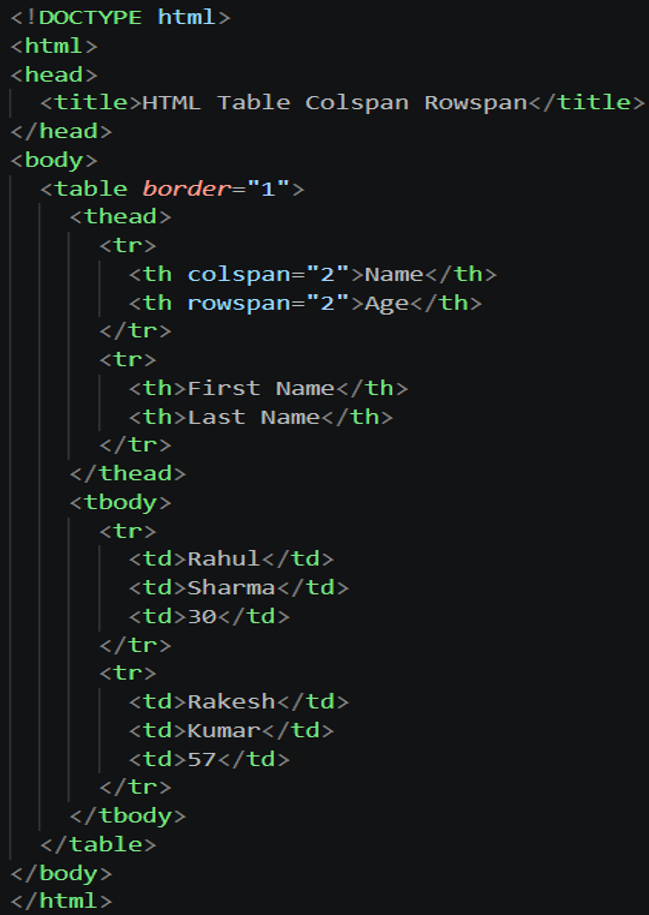
14. Create a table with colspan and rowspan attribute.
SOLUTION
OUTPUT
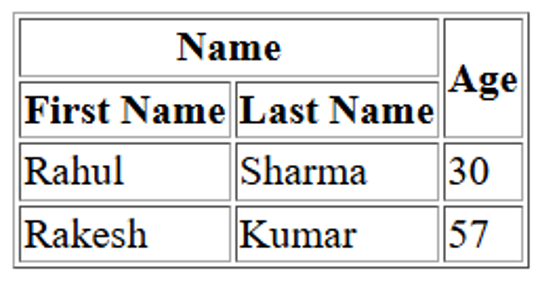
15. Create the following table:
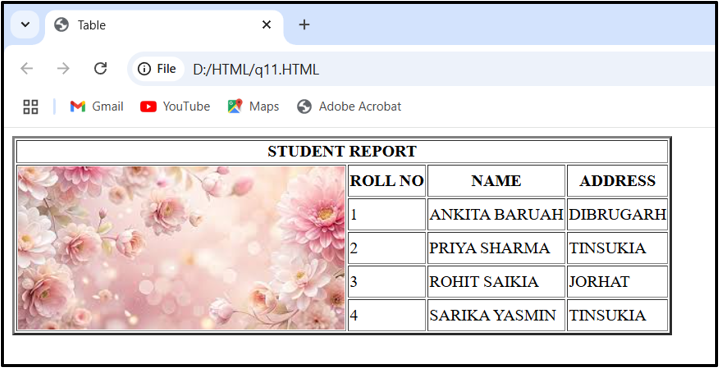
SOLUTION
<!DOCTYPE HTML>
<HTML>
<HEAD>
<TITLE>Table</TITLE>
<BODY>
<TABLE BORDER=”3″>
<THEAD>
<TR>
<TH COLSPAN=”4″>STUDENT REPORT</TH>
</TR>
</THEAD>
<TBODY>
<TR>
<TH ROWSPAN=”5″><IMG SRC=”D:\pictures\images.jpg”></TH>
<TH>ROLL NO</TH>
<TH>NAME</TH>
<TH>ADDRESS</TH>
</TR>
<TR>
<TD>1</TD>
<TD>ANKITA BARUAH</TD>
<TD>DIBRUGARH</TD>
</TR>
<TR>
<TD>2</TD>
<TD>PRIYA SHARMA</TD>
<TD>TINSUKIA</TD>
</TR>
<TR>
<TD>3</TD>
<TD>ROHIT SAIKIA</TD>
<TD>JORHAT</TD>
</TR>
<TR>
<TD>4</TD>
<TD>SARIKA YASMIN</TD>
<TD>TINSUKIA</TD>
</TR>
</TBODY>
</TABLE>
</BODY>
</HTML>
OUTPUT
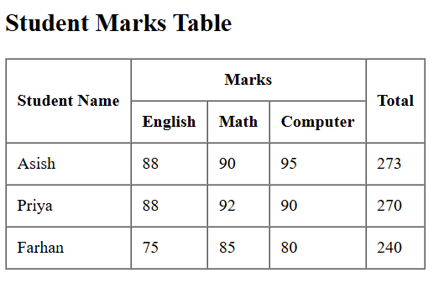
16. Create an HTML file that contains the following table, Student Marks:
SOLUTION
<!DOCTYPE html>
<html>
<head>
<title>Student Marks</title>
</head>
<body>
<h2>Student Marks Table</h2>
<table border=”1″ cellpadding=”10″ cellspacing=”0″>
<thead>
<tr>
<th rowspan=”2″>Student Name</th>
<th colspan=”3″>Marks</th>
<th rowspan=”2″>Total</th>
</tr>
<tr>
<th>English</th>
<th>Math</th>
<th>Computer</th>
</tr>
</thead>
<tbody>
<tr>
<td>Asish</td>
<td>88</td>
<td>90</td>
<td>95</td>
<td>273</td>
</tr>
<tr>
<td>Priya</td>
<td>88</td>
<td>92</td>
<td>90</td>
<td>270</td>
</tr>
<tr>
<td>Farhan</td>
<td>75</td>
<td>85</td>
<td>80</td>
<td>240</td>
</tr>
</tbody>
</table>
</body>
</html>
OUTPUT
17. Create the following table using HTML.
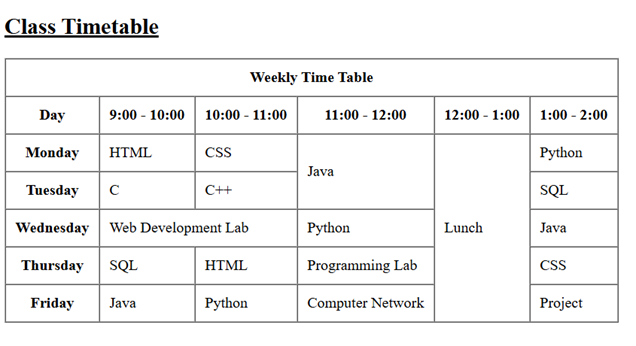
SOLUTION
<!DOCTYPE html>
<html>
<head>
<title>Class Timetable</title>
</head>
<body>
<h2><u>Class Timetable</u></h2>
<table border=”1″ cellpadding=”10″ cellspacing=”0″>
<thead>
<tr>
<th colspan=”6″>Weekly Time Table</th>
</tr>
<tr>
<th>Day</th>
<th>9:00 – 10:00</th>
<th>10:00 – 11:00</th>
<th>11:00 – 12:00</th>
<th>12:00 – 1:00</th>
<th>1:00 – 2:00</th>
</tr>
</thead>
<tbody>
<tr>
<th>Monday</th>
<td>HTML</td>
<td>CSS</td>
<td rowspan=”2″>Java</td>
<td rowspan=”5″>Lunch</td>
<td>Python</td>
</tr>
<tr>
<th>Tuesday</th>
<td>C</td>
<td>C++</td>
<td>SQL</td>
</tr>
<tr>
<th>Wednesday</th>
<td colspan=”2″>Web Development Lab</td>
<td>Python</td>
<td>Java</td>
</tr>
<tr>
<th>Thursday</th>
<td>SQL</td>
<td>HTML</td>
<td>Programming Lab</td>
<td>CSS</td>
</tr>
<tr>
<th>Friday</th>
<td>Java</td>
<td>Python</td>
<td>Computer Network</td>
<td>Project</td>
</tr>
</tbody>
</table>
</body>
</html>
OUTPUT
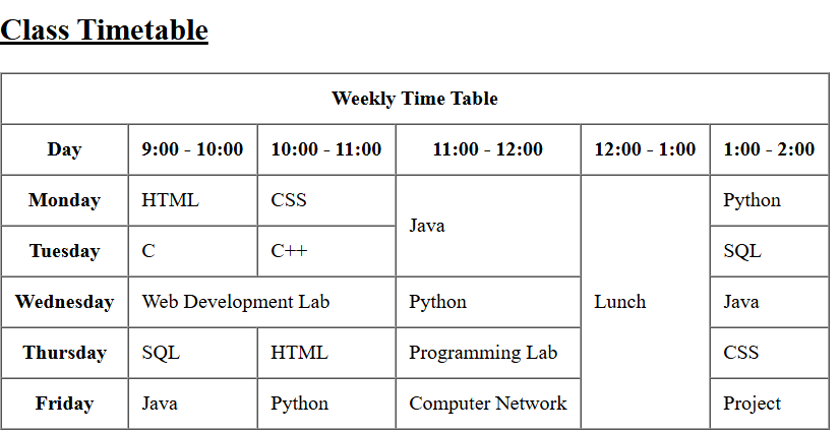
18. Create an HTML file that contains the following table, Employee Salary Details
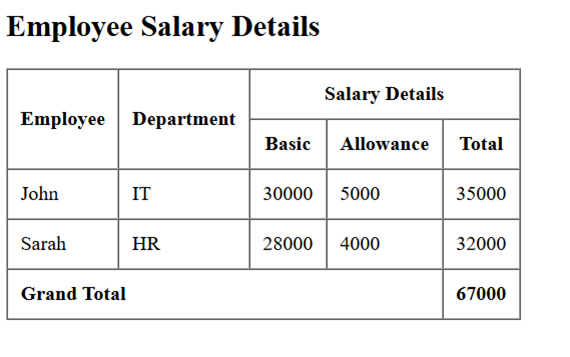
SOLUTION
<!DOCTYPE html>
<html>
<head>
<title>Employee Salary</title>
</head>
<body>
<h2>Employee Salary Details</h2>
<table border=”1″ cellpadding=”10″ cellspacing=”0″>
<thead>
<tr>
<th rowspan=”2″>Employee</th>
<th rowspan=”2″>Department</th>
<th colspan=”3″>Salary Details</th>
</tr>
<tr>
<th>Basic</th>
<th>Allowance</th>
<th>Total</th>
</tr>
</thead>
<tbody>
<tr>
<td>John</td>
<td>IT</td>
<td>30000</td>
<td>5000</td>
<td>35000</td>
</tr>
<tr>
<td>Sarah</td>
<td>HR</td>
<td>28000</td>
<td>4000</td>
<td>32000</td>
</tr>
</tbody>
<tfoot>
<tr>
<td colspan=”4″><b>Grand Total</b></td>
<td><b>67000</b></td>
</tr>
</tfoot>
</table>
</body>
</html>
OUTPUT
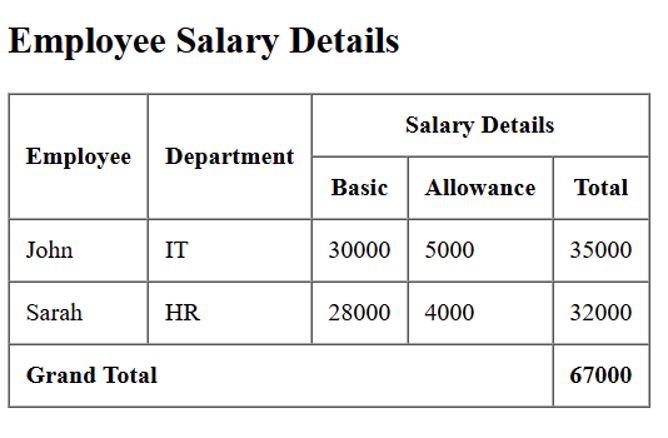
19. Create an HTML file that contains the following table:
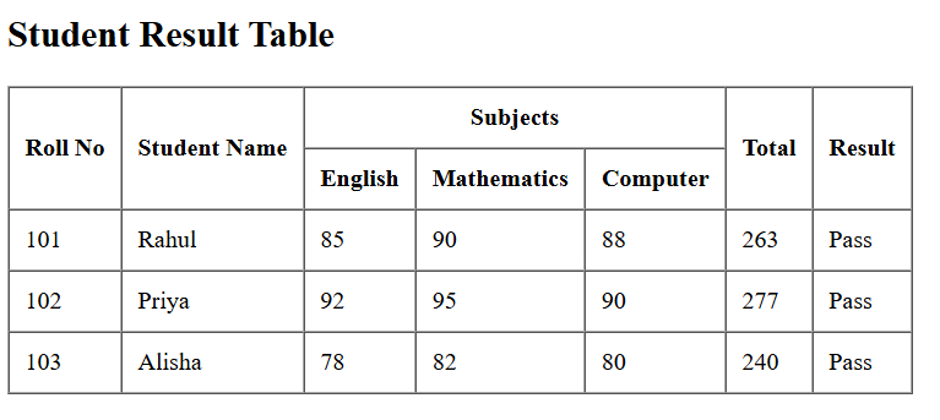
SOLUTION
<!DOCTYPE html>
<html>
<head>
<title>Student Result</title>
</head>
<body>
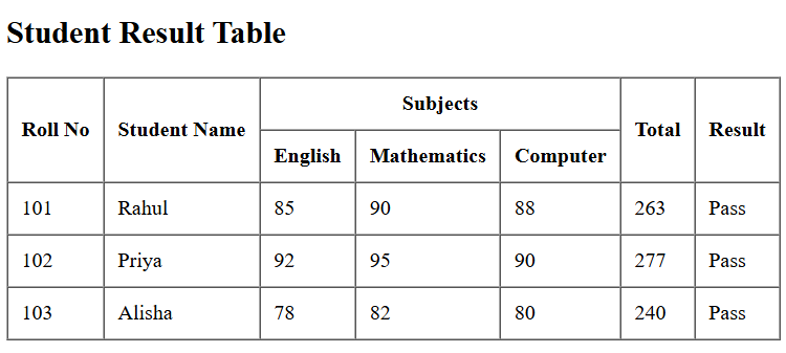
<h2>Student Result Table</h2>
<table border=”1″ cellpadding=”10″ cellspacing=”0″>
<thead>
<tr>
<th rowspan=”2″>Roll No</th>
<th rowspan=”2″>Student Name</th>
<th colspan=”3″>Subjects</th>
<th rowspan=”2″>Total</th>
<th rowspan=”2″>Result</th>
</tr>
<tr>
<th>English</th>
<th>Mathematics</th>
<th>Computer</th>
</tr>
</thead>
<tbody>
<tr>
<td>101</td>
<td>Rahul</td>
<td>85</td>
<td>90</td>
<td>88</td>
<td>263</td>
<td>Pass</td>
</tr>
<tr>
<td>102</td>
<td>Priya</td>
<td>92</td>
<td>95</td>
<td>90</td>
<td>277</td>
<td>Pass</td>
</tr>
<tr>
<td>103</td>
<td>Alisha</td>
<td>78</td>
<td>82</td>
<td>80</td>
<td>240</td>
<td>Pass</td>
</tr>
</tbody>
</table>
</body>
</html>
OUTPUT
20. Create the following table using HTML.
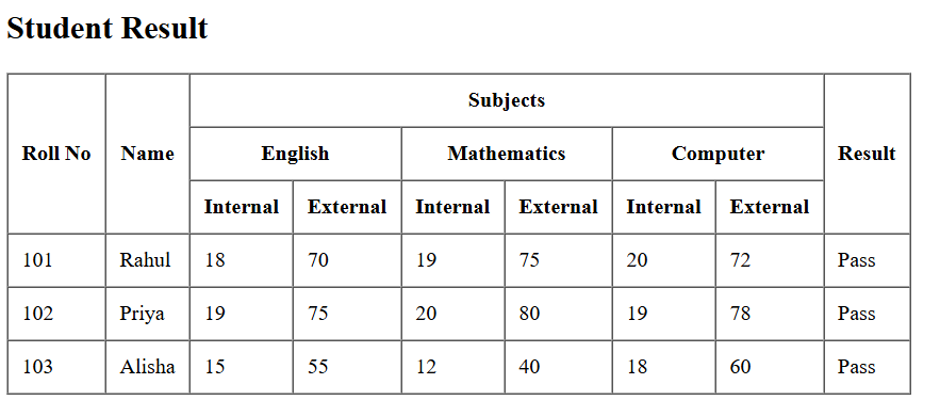
SOLUTION
<!DOCTYPE html>
<html>
<head>
<title>Student Result</title>
</head>
<body>
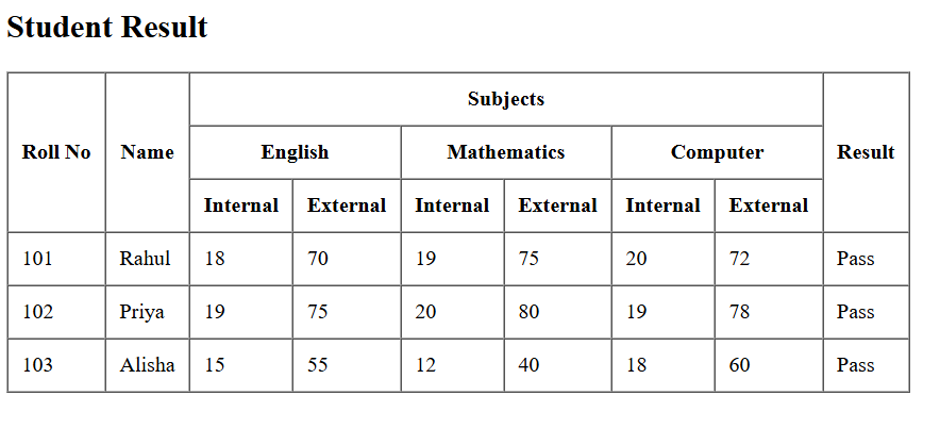
<h2>Student Result</h2>
<table border=”1″ cellpadding=”10″ cellspacing=”0″>
<thead>
<tr>
<th rowspan=”3″>Roll No</th>
<th rowspan=”3″>Name</th>
<th colspan=”6″>Subjects</th>
<th rowspan=”3″>Result</th>
</tr>
<tr>
<th colspan=”2″>English</th>
<th colspan=”2″>Mathematics</th>
<th colspan=”2″>Computer</th>
</tr>
<tr>
<th>Internal</th>
<th>External</th>
<th>Internal</th>
<th>External</th>
<th>Internal</th>
<th>External</th>
</tr>
</thead>
<tbody>
<tr>
<td>101</td>
<td>Rahul</td>
<td>18</td>
<td>70</td>
<td>19</td>
<td>75</td>
<td>20</td>
<td>72</td>
<td>Pass</td>
</tr>
<tr>
<td>102</td>
<td>Priya</td>
<td>19</td>
<td>75</td>
<td>20</td>
<td>80</td>
<td>19</td>
<td>78</td>
<td>Pass</td>
</tr>
<tr>
<td>103</td>
<td>Alisha</td>
<td>15</td>
<td>55</td>
<td>12</td>
<td>40</td>
<td>18</td>
<td>60</td>
<td>Pass</td>
</tr>
</tbody>
</table>
</body>
</html>
OUTPUT
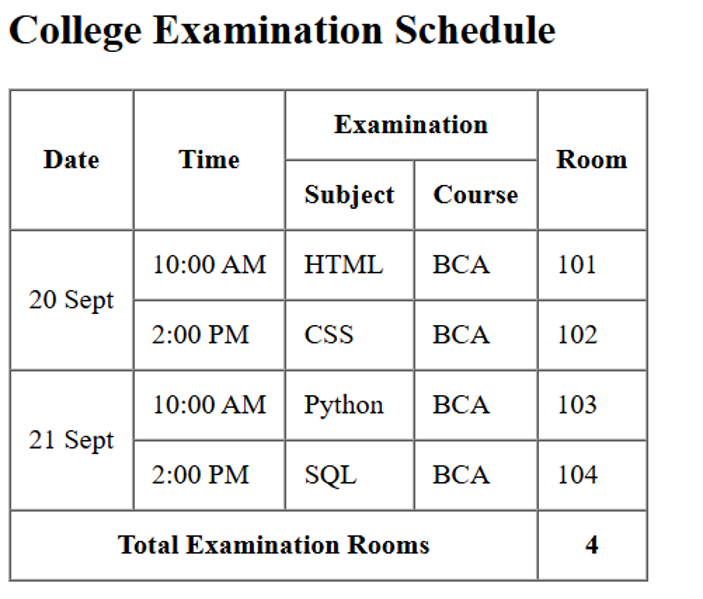
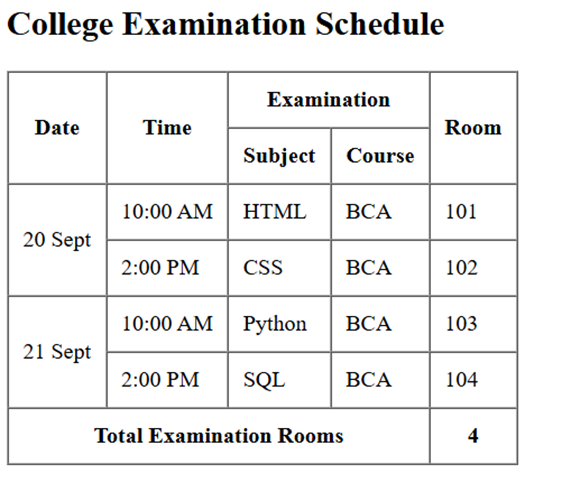
21. Create an HTML file that contains the following table:
SOLUTION
<!DOCTYPE html>
<html>
<head>
<title>College Examination</title>
</head>
<body>
<h2>College Examination Schedule</h2>
<table border=”1″ cellpadding=”10″ cellspacing=”0″>
<thead>
<tr>
<th rowspan=”2″>Date</th>
<th rowspan=”2″>Time</th>
<th colspan=”2″>Examination</th>
<th rowspan=”2″>Room</th>
</tr>
<tr>
<th>Subject</th>
<th>Course</th>
</tr>
</thead>
<tbody>
<tr>
<td rowspan=”2″>20 Sept</td>
<td>10:00 AM</td>
<td>HTML</td>
<td>BCA</td>
<td>101</td>
</tr>
<tr>
<td>2:00 PM</td>
<td>CSS</td>
<td>BCA</td>
<td>102</td>
</tr>
<tr>
<td rowspan=”2″>21 Sept</td>
<td>10:00 AM</td>
<td>Python</td>
<td>BCA</td>
<td>103</td>
</tr>
<tr>
<td>2:00 PM</td>
<td>SQL</td>
<td>BCA</td>
<td>104</td>
</tr>
</tbody>
<tfoot>
<tr>
<th colspan=”4″>Total Examination Rooms</th>
<th>4</th>
</tr>
</tfoot>
</table>
</body>
</html>
OUTPUT
22. Create an HTML file that contains the following table:
SOLUTION
<!DOCTYPE html>
<html>
<head>
<title>Employee Salary</title>
</head>
<body>
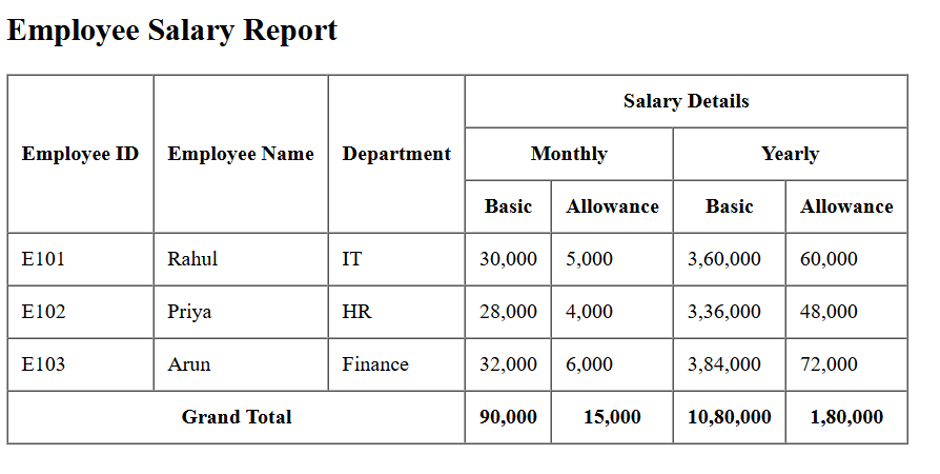
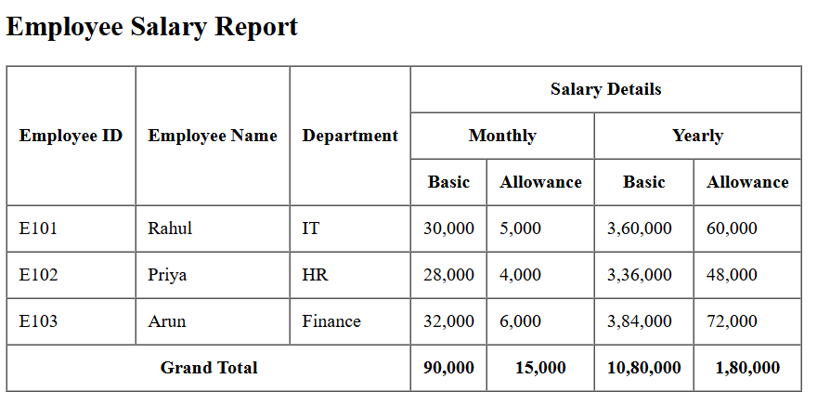
<h2>Employee Salary Report</h2>
<table border=”1″ cellpadding=”10″ cellspacing=”0″>
<thead>
<tr>
<th rowspan=”3″>Employee ID</th>
<th rowspan=”3″>Employee Name</th>
<th rowspan=”3″>Department</th>
<th colspan=”4″>Salary Details</th>
</tr>
<tr>
<th colspan=”2″>Monthly</th>
<th colspan=”2″>Yearly</th>
</tr>
<tr>
<th>Basic</th>
<th>Allowance</th>
<th>Basic</th>
<th>Allowance</th>
</tr>
</thead>
<tbody>
<tr>
<td>E101</td>
<td>Rahul</td>
<td>IT</td>
<td>30,000</td>
<td>5,000</td>
<td>3,60,000</td>
<td>60,000</td>
</tr>
<tr>
<td>E102</td>
<td>Priya</td>
<td>HR</td>
<td>28,000</td>
<td>4,000</td>
<td>3,36,000</td>
<td>48,000</td>
</tr>
<tr>
<td>E103</td>
<td>Arun</td>
<td>Finance</td>
<td>32,000</td>
<td>6,000</td>
<td>3,84,000</td>
<td>72,000</td>
</tr>
</tbody>
<tfoot>
<tr>
<th colspan=”3″>Grand Total</th>
<th>90,000</th>
<th>15,000</th>
<th>10,80,000</th>
<th>1,80,000</th>
</tr>
</tfoot>
</table>
</body>
</html>
OUTPUT
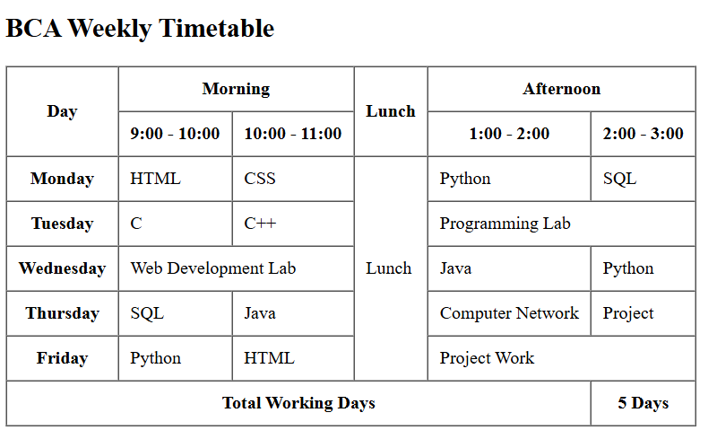
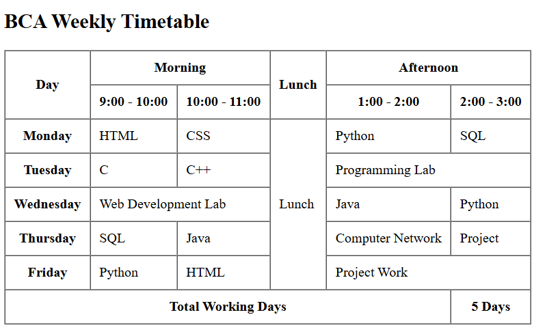
23. Create an HTML file that contains the following table:
SOLUTION
<!DOCTYPE html>
<html>
<head>
<title>College Timetable</title>
</head>
<body>
<h2>BCA Weekly Timetable</h2>
<table border=”1″ cellpadding=”10″ cellspacing=”0″>
<thead>
<tr>
<th rowspan=”2″>Day</th>
<th colspan=”2″>Morning</th>
<th rowspan=”2″>Lunch</th>
<th colspan=”2″>Afternoon</th>
</tr>
<tr>
<th>9:00 – 10:00</th>
<th>10:00 – 11:00</th>
<th>1:00 – 2:00</th>
<th>2:00 – 3:00</th>
</tr>
</thead>
<tbody>
<tr>
<th>Monday</th>
<td>HTML</td>
<td>CSS</td>
<td rowspan=”5″>Lunch</td>
<td>Python</td>
<td>SQL</td>
</tr>
<tr>
<th>Tuesday</th>
<td>C</td>
<td>C++</td>
<td colspan=”2″>Programming Lab</td>
</tr>
<tr>
<th>Wednesday</th>
<td colspan=”2″>Web Development Lab</td>
<td>Java</td>
<td>Python</td>
</tr>
<tr>
<th>Thursday</th>
<td>SQL</td>
<td>Java</td>
<td>Computer Network</td>
<td>Project</td>
</tr>
<tr>
<th>Friday</th>
<td>Python</td>
<td>HTML</td>
<td colspan=”2″>Project Work</td>
</tr>
</tbody>
<tfoot>
<tr>
<th colspan=”5″>Total Working Days</th>
<th>5 Days</th>
</tr>
</tfoot>
</table>
</body>
</html>
OUTPUT
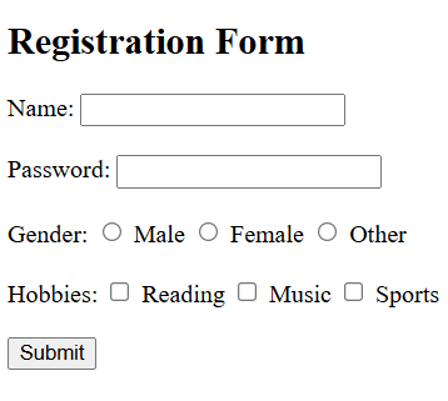
24. Design a form using text field, password field, radio buttons, checkboxes and submit button.
SOLUTION
<!DOCTYPE html>
<html>
<head>
<title>Registration Form</title>
</head>
<body>
<h2>Registration Form</h2>
<form>
<!– Text Field –>
<label for=”name”>Name:</label>
<input type=”text” id=”name” name=”name”><br><br>
<!– Password Field –>
<label for=”password”>Password:</label>
<input type=”password” id=”password” name=”password”><br><br>
<!– Radio Buttons –>
<label>Gender:</label>
<input type=”radio” id=”male” name=”gender” value=”Male”>
<label for=”male”>Male</label>
<input type=”radio” id=”female” name=”gender” value=”Female”>
<label for=”female”>Female</label>
<input type=”radio” id=”other” name=”gender” value=”Other”>
<label for=”other”>Other</label><br><br>
<!– Checkboxes –>
<label>Hobbies:</label>
<input type=”checkbox” id=”reading” name=”hobby” value=”Reading”>
<label for=”reading”>Reading</label>
<input type=”checkbox” id=”music” name=”hobby” value=”Music”>
<label for=”music”>Music</label>
<input type=”checkbox” id=”sports” name=”hobby” value=”Sports”>
<label for=”sports”>Sports</label><br><br>
<!– Submit Button –>
<input type=”submit” value=”Submit”>
</form>
</body>
</html>
OUTPUT
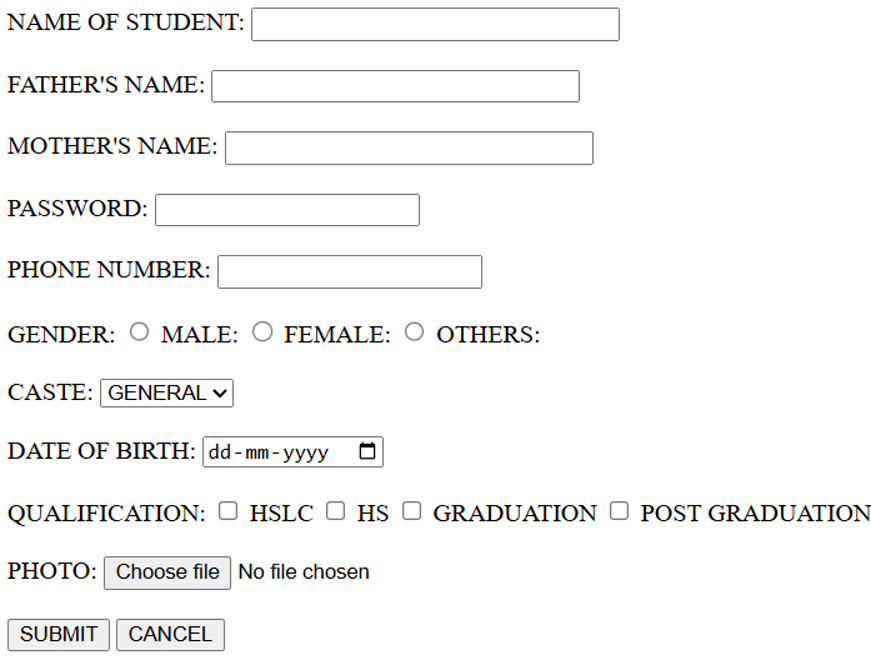
25. Create an admission form. The form should include the following:
a. Name of student
b. Father’s Name
c. Mother’s Name
d. Password
e. Phone Number
f. Gender (use radio button)
g. Caste
h. Date of Birth
i. Qualification (Use checkbox)
j. Photo
k. Button for Save and Cancel
SOLUTION
<!DOCTYPE HTML>
<HTML>
<HEAD>
<TITLE>Admission Form</TITLE>
</HEAD>
<BODY>
<FORM>
<LABEL FOR=”NAME”>NAME OF STUDENT:</LABEL>
<INPUT TYPE=”TEXT” ID=”NAME” NAME=”SNM” SIZE=”30″ MAXLENGTH=”25″><BR><BR>
<LABEL FOR=”FNAME”>FATHER’S NAME:</LABEL>
<INPUT TYPE=”TEXT” ID=”FNAME” NAME=”FNM” SIZE=”30″ MAXLENGTH=”25″><BR><BR>
<LABEL FOR=”MNAME”>MOTHER’S NAME:</LABEL>
<INPUT TYPE=”TEXT” ID=”MNAME” NAME=”MNM” SIZE=”30″ MAXLENGTH=”25″><BR><BR>
<LABEL FOR=”PASSWORD”>PASSWORD:</LABEL>
<INPUT TYPE=”PASSWORD” ID=”PASSWORD” NAME=”PSD” SIZE=”20″ MAXLENGTH=”8″><BR><BR>
<LABEL FOR=”PHONE”>PHONE NUMBER:</LABEL>
<INPUT TYPE=”TEL” ID=”PHONE” NAME=”PHN”><BR><BR>
<LABEL>GENDER:</LABEL>
<INPUT TYPE=”RADIO” ID=”MALE” NAME=”GENDER” VALUE=”M”>
<LABEL FOR=”MALE”>MALE:</LABEL>
<INPUT TYPE=”RADIO” ID=”FEMALE” NAME=”GENDER” VALUE=”F”>
<LABEL FOR=”FEMALE”>FEMALE:</LABEL>
<INPUT TYPE=”RADIO” ID=”OTHERS” NAME=”GENDER” VALUE=”O”>
<LABEL FOR=”OTHERS”>OTHERS:</LABEL><BR><BR>
<LABEL FOR=”CASTE”>CASTE:</LABEL>
<SELECT ID=”CASTE” NAME=”CASTE”>
<OPTION VALUE=”GENERAL”>GENERAL</OPTION>
<OPTION VALUE=”OBC”>OBC</OPTION>
<OPTION VALUE=”MOBC”>MOBC</OPTION>
<OPTION VALUE=”SC”>SC</OPTION>
<OPTION VALUE=”ST”>ST</OPTION>
</SELECT><BR><BR>
<LABEL FOR=”DOB”>DATE OF BIRTH:</LABEL>
<input TYPE=”DATE” ID=”DOB” NAME=”DOB”><BR><BR>
<LABEL>QUALIFICATION:</LABEL>
<INPUT TYPE=”CHECKBOX” ID=”HSLC” NAME=”QF” VALUE=”HSLC”>
<LABEL FOR=”HSLC”>HSLC</LABEL>
<INPUT TYPE=”CHECKBOX” ID=”HS” NAME=”QF” VALUE=”HS”>
<LABEL FOR=”HS”>HS</LABEL>
<INPUT TYPE=”CHECKBOX” ID=”GRADUATION” NAME=”QF” VALUE=”GRADUATION”>
<LABEL FOR=”GRADUATION”>GRADUATION</LABEL>
<INPUT TYPE=”CHECKBOX” NAME=”QF” VALUE=”POST GRADUATION”>
<LABEL FOR=”POST GRADUATION”>POST GRADUATION</LABEL><BR><BR>
<LABEL FOR=”PHOTO”>PHOTO:</LABEL>
<INPUT TYPE=”FILE” ID=”PHOTO” NAME=”MYFILE”><BR><BR>
<INPUT TYPE=”SUBMIT” VALUE=”SUBMIT”>
<INPUT TYPE=”RESET” VALUE=”CANCEL”>
</FORM>
</BODY>
</HTML>
OUTPUT
26. Create a Basic Login Form
SOLUTION
<!DOCTYPE html>
<html>
<head>
<title>Login Form</title>
</head>
<body>
<h2>Login Form</h2>
<form action=”#” method=”post”>
<fieldset>
<legend>Account Login</legend>
<!– Username Field –>
<p>
<label for=”username”>Username:</label>
<input type=”text” id=”username” name=”username” placeholder=”Enter username” required>
</p>
<!– Password Field –>
<p>
<label for=”password”>Password:</label>
<input type=”password” id=”password” name=”password” required>
</p>
<input type=”submit” value=”Login”>
<input type=”reset” value=”Clear”>
</fieldset>
</form>
</body>
</html>
OUTPUT
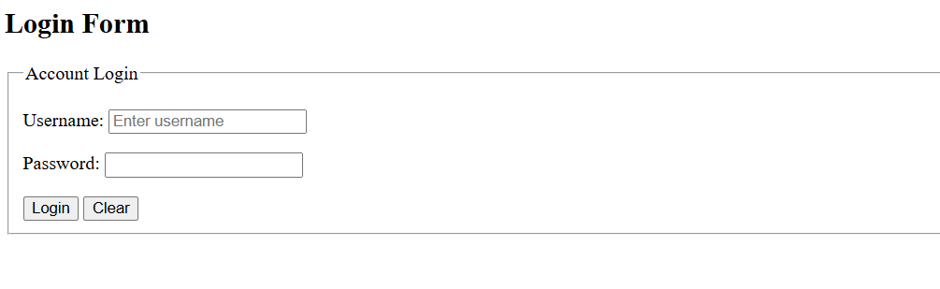
27. Design an html form to take the information of a customer visiting a departmental store such as name, phone no, preferred days of purchasing , favourite item ( to be selected from a list of items), suggestions etc. One should provide button to Submit as well as Reset the form contents.
SOLUTION
<!DOCTYPE html>
<html>
<head>
<title>Departmental Store Customer Form</title>
</head>
<body>
<h2>Departmental Store – Customer Information Form</h2>
<form>
<!– Name –>
<label for=”name”>Customer Name:</label>
<input type=”text” id=”name” name=”name” required><br><br>
<!– Phone Number –>
<label for=”phone”>Phone Number:</label>
<input type=”tel” id=”phone” name=”phone” pattern=”[0-9]{10}” placeholder=”Enter 10-digit number” required><br><br>
<!– Preferred Days –>
<label>Preferred Days of Purchasing:</label><br>
<input type=”checkbox” id=”monday” name=”day” value=”Monday”>
<label for=”monday”>Monday</label>
<input type=”checkbox” id=”wednesday” name=”day” value=”Wednesday”>
<label for=”wednesday”>Wednesday</label>
<input type=”checkbox” id=”friday” name=”day” value=”Friday”>
<label for=”friday”>Friday</label>
<input type=”checkbox” id=”saturday” name=”day” value=”Saturday”>
<label for=”saturday”>Saturday</label>
<input type=”checkbox” id=”sunday” name=”day” value=”Sunday”>
<label for=”sunday”>Sunday</label><br><br>
<!– Favourite Item –>
<label for=”item”>Favourite Item:</label>
<select id=”item” name=”item” required>
<option value=””>– Select an Item –</option>
<option value=”Grocery”>Grocery</option>
<option value=”Clothing”>Clothing</option>
<option value=”Electronics”>Electronics</option>
<option value=”Cosmetics”>Cosmetics</option>
<option value=”Home Appliances”>Home Appliances</option>
<option value=”Stationery”>Stationery</option>
</select><br><br>
<!– Suggestions –>
<label for=”suggestions”>Suggestions:</label><br>
<textarea id=”suggestions” name=”suggestions” rows=”5″ cols=”40″ placeholder=”Enter your suggestions here…”></textarea><br><br>
<!– Buttons –>
<input type=”submit” value=”Submit”>
<input type=”reset” value=”Reset”>
</form>
</body>
</html>
OUTPUT
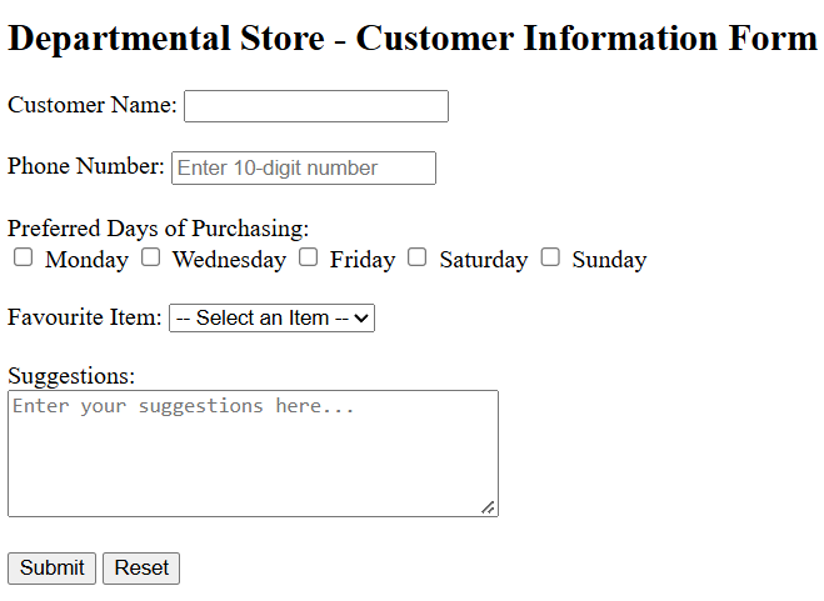
28. Create a webpage for your college with three frames. The first frame will be horizontal on displaying the name and address of the college. The second frame which is vertical on left will list the available courses. The third frame will be to the right of the second frame and will display the introduction to the college.
SOLUTION
<!DOCTYPE html>
<HTML>
<FRAMESET ROWS=”20%,80%” BORDER=”10″ BORDERCOLOR=”BROWN”>
<FRAME NAME=”F1″ SRC=”D:\HTML\ADDRESS.HTML” MARGINHEIGHT=”30″ MARGINWIDTH=”30″>
<FRAMESET COLS=”22%,78%” BORDER=”10″ BORDERCOLOR=”BROWN”>
<FRAME NAME=”F1″ SRC=”D:\HTML\COURSES.HTML” MARGINHEIGHT=”50″ MARGINWIDTH=”30″>
<FRAME NAME=”F1″ SRC=”D:\HTML\ABOUT.HTML” MARGINHEIGHT=”50″ MARGINWIDTH=”30″>
</HTML>
ADDRESS.HTML
<!DOCTYPE HTML>
<HTML>
<HEAD>
<TITLE>ADDRESS TAG</TITLE>
</HEAD>
<BODY>
<CENTER>
<TABLE><TD>
<ADDRESS>
<B><FONT SIZE=”4″>TINSUKIA COLLEGE<BR>
Tinsukia College Rd<BR>
Kachujan<BR>
Tinsukia,Assam<BR>
786125<BR>
</B>
</ADDRESS>
</TD></TABLE>
</CENTRER>
</BODY>
</HTML>
COURSES.HTML
<!DOCTYPE HTML>
<HTML>
<HEAD>
<TITLE>About Courses</TITLE>
</HEAD>
<BODY>
<FONT SIZE=”4″>
<UL type=”square”>
<LI>Undergraduate Programs:
<UL>
<LI>BA
<LI>BSc
<LI>BCom
<LI>BCA
<LI>BBA
</UL>
<LI>Post Graduate Programs:
<UL>
<LI>MA
<LI>MSc
<LI>MCom
</UL>
<LI>Higher Secondary Courses:
<UL>
<LI>11th
<LI>12th
</UL>
<LI>Distance Education Courses:
<UL>
<LI>BA
<LI>BCom
<LI>BCA
<LI>BPP
<LI>MA
<LI>MSW
</UL>
</UL>
</BODY>
</HTML>
ABOUT.HTML
<!DOCTYPE HTML>
<HTML>
<HEAD>
<TITLE>Tinsukia College</TITLE>
</HEAD>
<BODY>
<H1 ALIGN=”CENTER”>TINSUKIA COLLEGE</H1>
<FONT SIZE=”4″>
<P ALIGN=”JUSTIFY”>Tinsukia College, established in 1956, is one of the oldest undergraduate, coeducational college situated in Tinsukia, Assam. This college is affiliated with the Dibrugarh University. Tinsukia College, an institution that initiated its academic endeavour with a handful of students and four faculty members now has grown into a huge family with an enrolment of more than 3500 students and a teaching fraternity with almost 80 members contributing to the growth of this premier institution of higher education. This Co-ed institution has been imparting education both at Higher Secondary & Degree levels in 5 faculties of Arts, Science, Commerce, Management and Computer Science. Currently, the college has altogether 17 departments, viz. Assamese, Bengali, Botany, Chemistry, Commerce, Computer Science, Economics, English, Geography, Hindi, History, Mathematics, Philosophy, Physics, Political Science, Statistics and Zoology. Except Bengali and Computer Science all the other departments offer Honours courses at the degree level. Besides, it provides two professional degree courses, viz, BBA and BCA. The college has a study centre of Krishna Kanta Handique State Open University under which several UG and PG courses are offered. </FONT>
</BODY>
</HTML>
OUTPUT

29. Create a website in which all the hyperlinks are the list items of an unordered list. You have to place this list in a frame that lies in left side of our home page and after clicking any hyperlink, the corresponding details should be displayed in a frame lying in right side of your web page.
SOLUTION
<!DOCTYPE HTML>
<HTML>
<FRAMESET COLS=”20%,80%” BORDER=”10″ BORDERCOLOR=”BLUE”>
<FRAME NAME=”F1″ SRC=”D:\HTML\LINK.HTML” MARGINHEIGHT=”50″ MARGINWIDTH=”30″>
<FRAME NAME=”F2″ SRC=” “ MARGINHEIGHT=”50″ MARGINWIDTH=”50″>
</HTML>
LINK.HTML
<!DOCTYPE HTML>
<HTML>
<HEAD>
<TITLE>Link Page</TITLE>
</HEAD>
<BODY>
<UL type=”square”>
<LI><A HREF=”D:\HTML\q1.html” TARGET=”F2″>My College</A></LI>
<LI><A HREF=”D:\HTML\q3.HTML” TARGET=”F2″>My City</A></LI>
<LI><A HREF=”D:\HTML\q10.HTML” TARGET=”F2″>My Hobby</A></LI>
<LI><A HREF=”D:\HTML\q6.HTML” TARGET=”F2″>What is HTML?</A></LI>
<LI><A HREF=”D:\HTML\q16.HTML” TARGET=”F2″>Form in HTML</A></LI>
</UL>
</BODY>
</HTML>
OUTPUT

Business dicker This was beautiful Admin. Thank you for your reflections.
allegheny county real estate very informative articles or reviews at this time.