STUDENT MANAGEMENT SYSTEM
Create Student Table
CREATE TABLE Student(Student_ID INT PRIMARY KEY, Student_Name CHAR, Gender CHAR, Age INT, Phone_No CHAR, Course CHAR);
Create Marks Table
CREATE TABLE Marks(Student_ID INT, Basic_Marks INT, HTML_Marks INT, SQL_Marks INT, FOREIGN KEY(Student_ID) REFERENCES Student (Student_ID));
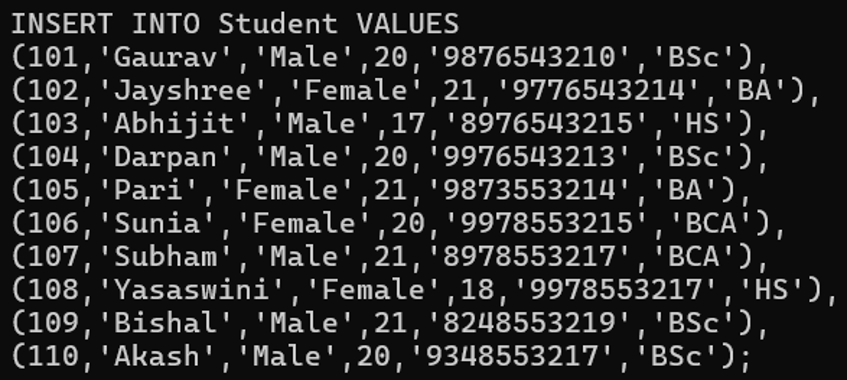
Insert Student Records
Insert Marks

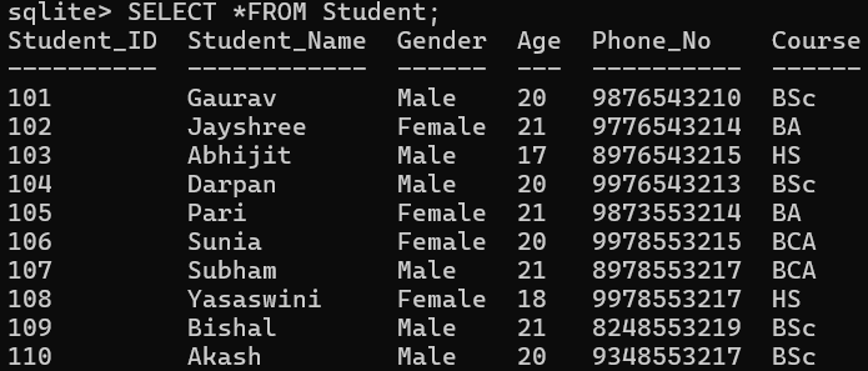
Display All Students
Search For a Student

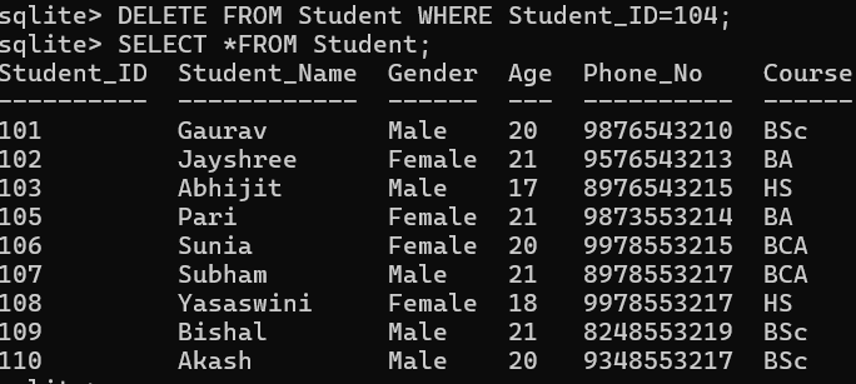
Update Student Information and Check the Updated Record
UPDATE Student SET Phone_No = ‘9576543213’ WHERE Student_ID = 102;

Delete a Student and View the Records
Display Student Marks
SELECT Student.Student_ID, Student.Student_Name, Marks.Basic_Marks,Marks.HTML_Marks,Marks.SQL_Marks FROM Student JOIN Marks ON Student.Student_ID = Marks.Student_ID;

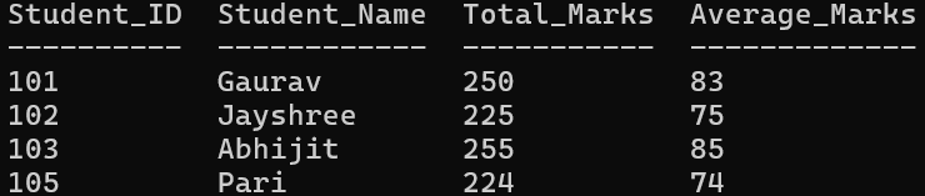
Calculate Total and Average Marks
SELECT Student.Student_ID, Student.Student_Name, (Basic_Marks + HTML_Marks + SQL_Marks) as Total_Marks, (Basic_Marks + HTML_Marks + SQL_Marks)/3 as Average_Marks FROM Student JOIN Marks ON Student.Student_ID = Marks.Student_ID;
Find Students with Average Marks Above 80
SELECT Student.Student_Name, (Basic_Marks + HTML_Marks + SQL_Marks)/3 as Average_Marks FROM Student JOIN Marks ON Student.Student_ID = Marks.Student_ID WHERE (Basic_Marks + HTML_Marks + SQL_Marks)/3 >= 80;

SCHOOL DATABASE MANAGEMENT SYSTEM
Create Students Table
CREATE TABLE Students (Student_ID INT PRIMARY KEY, Name CHAR, Gender CHAR, Class CHAR, Address CHAR, Phone CHAR);
Create Teachers Table
CREATE TABLE Teachers (Teacher_ID INT PRIMARY KEY, Name CHAR, Subject CHAR, Phone CHAR, Salary INT);
Create Subjects Table
CREATE TABLE Subjects (Subject_ID INT PRIMARY KEY, Subject_Name CHAR, Teacher_ID INT, FOREIGN KEY (Teacher_ID) REFERENCES Teachers (Teacher_ID));
Create Marks Table
CREATE TABLE Marks (Student_ID INT, Subject_ID INT, Marks INT, FOREIGN KEY (Student_ID) REFERENCES Students (Student_ID), FOREIGN KEY (Subject_ID) REFERENCES Subjects (Subject_ID));
Insert Student Data

Insert Teacher Data

Insert Subject Data

Insert Marks

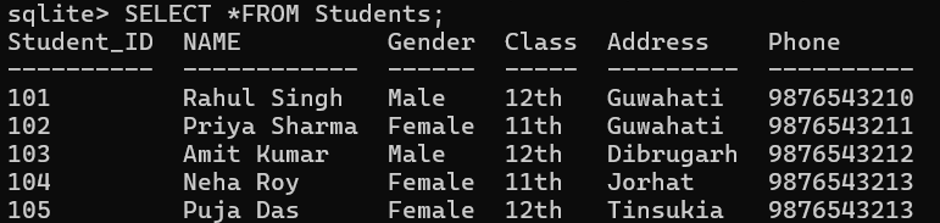
Display All Students
Display Students with Marks
SELECT Student.Name, Subjects.Subject_Name, Marks.Marks FROM Marks JOIN Student ON Marks.Student_ID = Student.Student_ID JOIN Subjects ON Marks.Subject_ID = Subjects.Subject_ID;

Find Students Who Scored More Than 80
SELECT Student.Name, Subjects.Subject_Name, Marks.Marks FROM Marks JOIN Student ON Marks.Student_ID = Student.Student_ID JOIN Subjects ON Marks.Subject_ID = Subjects.Subject_ID WHERE Marks.Marks > 80;

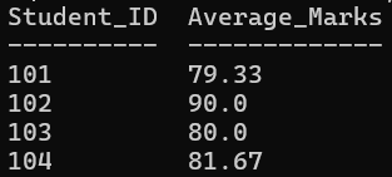
Calculate Average Marks:
SELECT Student_ID, ROUND (AVG (Marks),2) AS Average_Marks FROM Marks GROUP BY Student_ID;
EMPLOYEE DATABASE SYSTEM
Create Department Table
CREATE TABLE Department (Department_ID INT PRIMARY KEY, Department_Name CHAR, Location CHAR);
Create Employee Table
CREATE TABLE Employee (Employee_ID INT PRIMARY KEY, Employee_Name CHAR, Gender CHAR, Age INT, Phone CHAR, Email CHAR, Job_Title CHAR, Salary INT, Department_ID INT, FOREIGN KEY (Department_ID) REFERENCES Department (Department_ID));
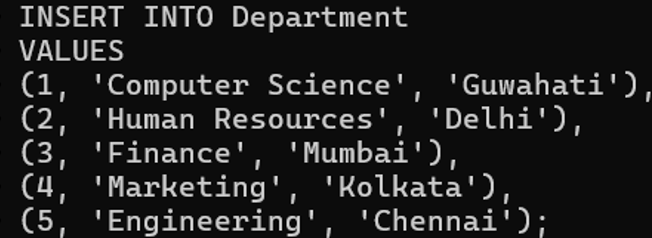
Insert Department Records
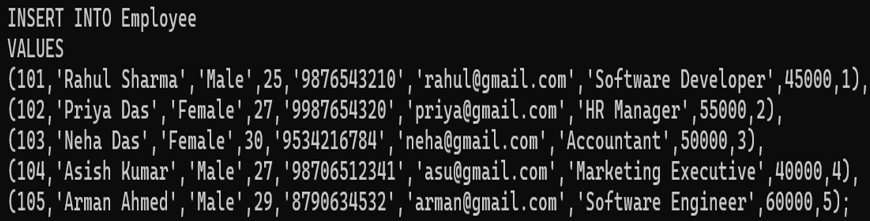
Insert Employee Records
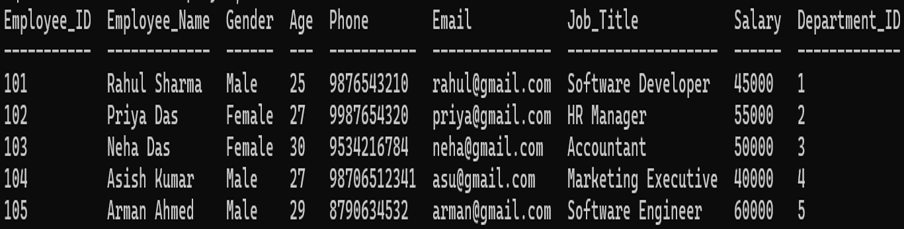
Display All Employees
SELECT *FROM Employee;
Display Employee and Department Details
SELECT Employee.Employee_ID, Employee.Employee_Name, Employee.Job_Title, Employee.Salary, Department.Department_Name, Department.Location FROM Employee JOIN Department ON Employee.Department_ID = Department.Department_ID;

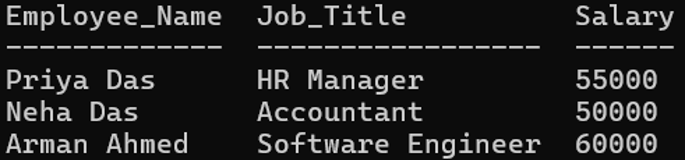
Find Employees with Salary Greater Than 45,000
SELECT Employee_Name, Job_Title, Salary FROM Employee WHERE Salary > 45000;
Find Average Employee Salary
SELECT AVG(Salary) AS Average_Salary FROM Employee;

Find Highest Salary
SELECT MAX(Salary) AS Highest_Salary FROM Employee;

Find Lowest Salary
SELECT MIN(Salary) AS Lowest_Salary FROM Employee;

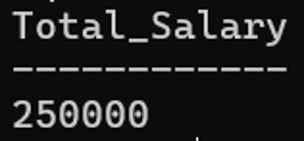
Calculate Total Salary
SELECT SUM(Salary) AS Total_Salary FROM Employee;
Count Employees
SELECT COUNT(*) AS Total_Employees FROM Employee;

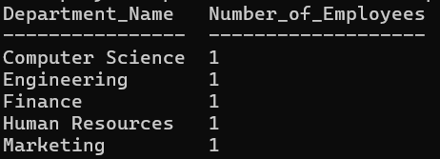
Count Employees in Each Department
SELECT Department.Department_Name, COUNT(Employee.Employee_ID) AS Number_of_Employees FROM Department LEFT JOIN Employee ON Department.Department_ID = Employee.Department_ID GROUP BY Department.Department_Name;
Update Employee Information
UPDATE Employee SET Salary = 50000 WHERE Employee_ID = 101;

Delete an Employee
DELETE FROM Employee WHERE Employee_ID = 104;

INVENTORY MANAGEMENT SYSTEM
Create Products Table
CREATE TABLE Products (Product_ID INT PRIMARY KEY, Product_Name CHAR, Category CHAR, Price FLOAT, Quantity INT);
Create Suppliers Table
CREATE TABLE Suppliers (Supplier_ID INT PRIMARY KEY, Supplier_Name VARCHAR, Phone CHAR, Address CHAR);
Create Purchases Table
CREATE TABLE Purchases (Purchase_ID INT PRIMARY KEY, Product_ID INT, Supplier_ID INT, Purchase_Date DATE, Quantity INT, FOREIGN KEY (Product_ID) REFERENCES Products(Product_ID), FOREIGN KEY (Supplier_ID) REFERENCES Suppliers(Supplier_ID));
Create Sales Table
CREATE TABLE Sales (Sale_ID INT PRIMARY KEY, Product_ID INT, Sale_Date DATE, Quantity INT, FOREIGN KEY (Product_ID) REFERENCES Products(Product_ID));
Insert Product Data

Insert Supplier Data

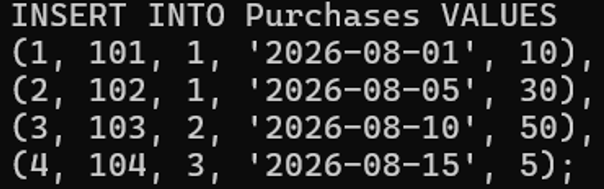
Insert Purchase Data
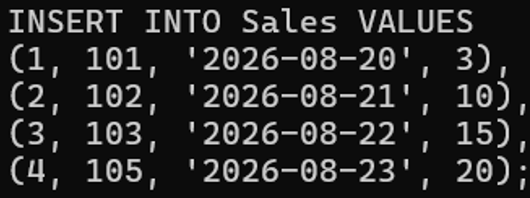
Insert Sales Data
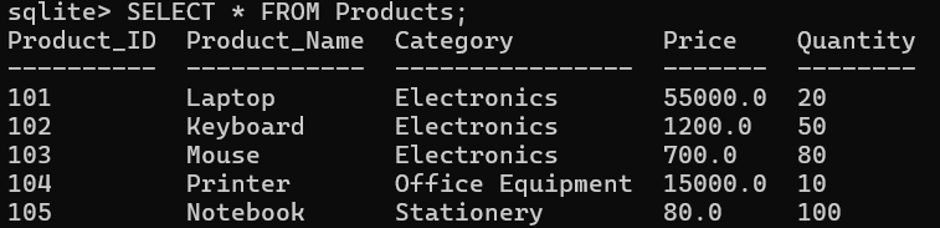
Display All Products
Display Purchase Details
SELECT Purchases.Purchase_ID, Products.Product_Name, Suppliers.Supplier_Name,Purchases.Purchase_Date, Purchases.Quantity FROM Purchases JOIN Products ON Purchases.Product_ID = Products.Product_ID JOIN Suppliers ON Purchases.Supplier_ID = Suppliers.Supplier_ID;

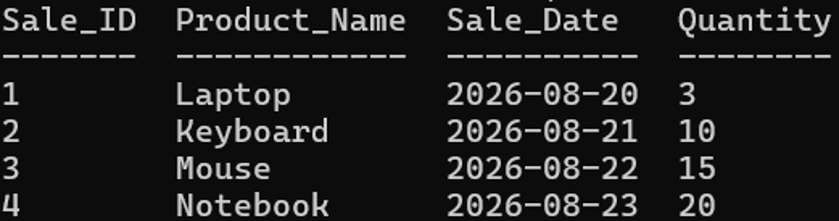
Display Sales Details
SELECT Sales.Sale_ID, Products.Product_Name, Sales.Sale_Date, Sales.Quantity FROM Sales JOIN Products ON Sales.Product_ID = Products.Product_ID;
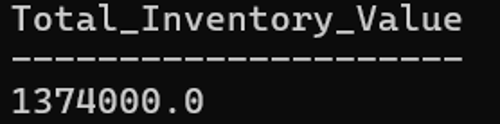
Calculate Total Inventory Value
SELECT SUM(Price * Quantity) AS Total_Inventory_Value FROM Products;
Find Most Expensive Product
SELECT * FROM Products ORDER BY Price DESC LIMIT 1;

Sales Performance Report
SELECT p.Product_Name, SUM(s.Quantity) AS TotalUnitsSold, SUM(s.Quantity * p.Price) AS TotalRevenueGenerated FROM Sales s JOIN Products p ON s.Product_ID = p.Product_ID GROUP BY p.Product_ID, p.Product_Name ORDER BY TotalRevenueGenerated DESC;

LIBRARY MANAGEMENT SYSTEM
Create Books Table
CREATE TABLE Books (BookID INTEGER PRIMARY KEY AUTOINCREMENT, BookName CHAR NOT NULL, AuthorName CHAR, Category CHAR, AvailableCopies INT);
Create Members Table
CREATE TABLE Members (MemberID INTEGER PRIMARY KEY AUTOINCREMENT, MemberName CHAR NOT NULL, Email CHAR, Phone CHAR, Address CHAR);
Create Issue/Return Table
CREATE TABLE Book_Issue (IssueID INTEGER PRIMARY KEY AUTOINCREMENT, BookID INT, MemberID INT, IssueDate DATE NOT NULL, ReturnDate DATE, Status CHAR DEFAULT ‘Issued’, FOREIGN KEY (BookID) REFERENCES Books(BookID), FOREIGN KEY (MemberID) REFERENCES Members(MemberID));
Add Books into the Books Table

Register Members into the Members Table

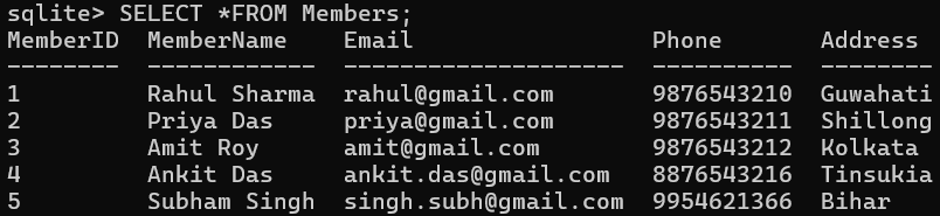
Display All Books
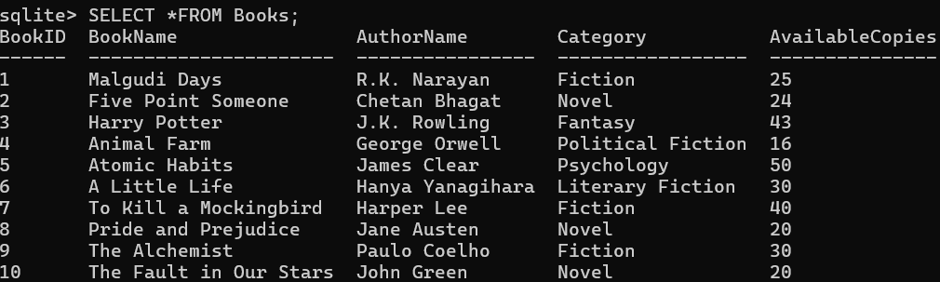
View Members
Issue a Book

View Issue/Return Table Data

Update available Copies of Books
UPDATE Books SET Availablecopies = AvailableCopies-1 WHERE BookID=2;
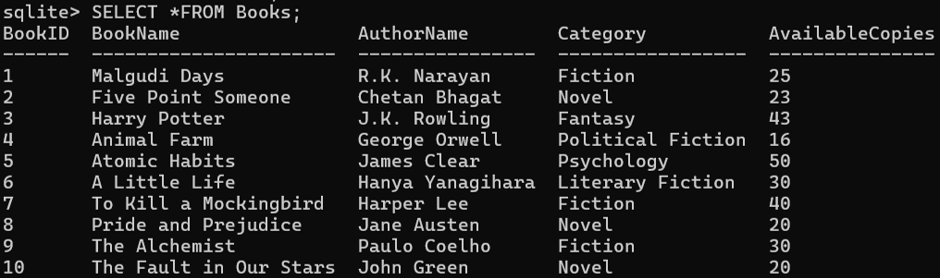
After Issuing Book, Books Table Data
Display Issued Books
SELECT BI.IssueID, B.BookName, M.MemberName, BI.IssueDate, BI.Status FROM Book_Issue BI JOIN Books B ON BI.BookID = B.BookID JOIN Members M ON BI.MemberID = M.MemberID WHERE BI.Status = ‘Issued’;

Return a Book

View Issue/Return Table Data

Increase available quantity
UPDATE Books SET AvailableCopies = AvailableCopies+1 WHERE BookID=2;
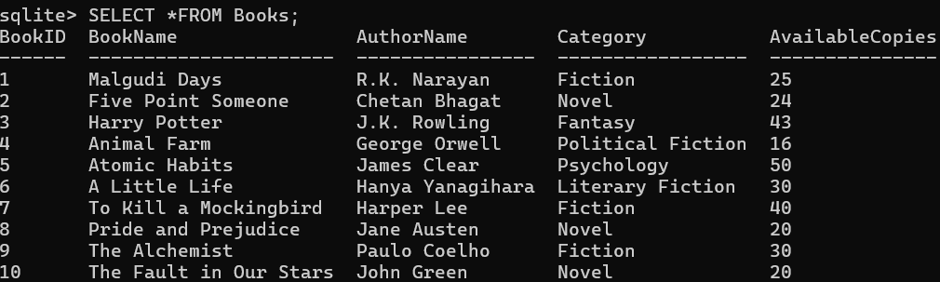
After Returning Books, Book Table Data
MOVIE DATABASE MANAGEMENT SYSTEM
Create Directors Table
CREATE TABLE Directors (Director_ID INT PRIMARY KEY, Director_Name CHAR, Country CHAR);
Create Movies Table
CREATE TABLE Movies (Movie_ID INT PRIMARY KEY, Movie_Name CHAR, Genre CHAR, Release_Year INT, Language CHAR, Rating FLOAT, Director_ID INT, FOREIGN KEY (Director_ID) REFERENCES Directors(Director_ID));
Create Actors Table
CREATE TABLE Actors (Actor_ID INT PRIMARY KEY, Actor_Name CHAR, Gender CHAR, Age INT);
Create Movie_Cast
CREATE TABLE Movie_Cast ( Movie_ID INT, Actor_ID INT, Role_Name CHAR, PRIMARY KEY (Movie_ID, Actor_ID), FOREIGN KEY (Movie_ID) REFERENCES Movies(Movie_ID), FOREIGN KEY (Actor_ID) REFERENCES Actors(Actor_ID));
Insert Directors Data

Insert Movie Data

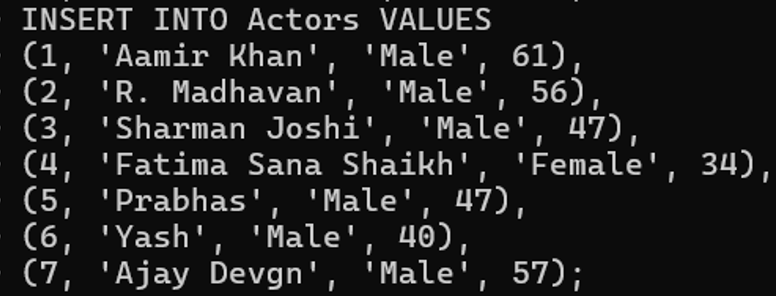
Insert Actor Data
Insert Movie-Cast Details

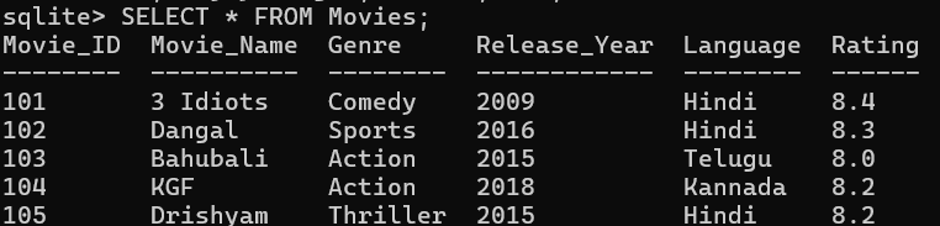
Display All Movies
Fetch All Movies Along with Director Names
SELECT Movies.Movie_Name, Directors.Director_Name FROM Movies JOIN Directors ON Movies.Director_ID = Directors.Director_ID;

Display Movie, Actor and Role
SELECT Movies.Movie_Name, Actors.Actor_Name, Movie_Cast.Role_Name FROM Movie_Cast JOIN Movies ON Movie_Cast.Movie_ID = Movies.Movie_ID JOIN Actors ON Movie_Cast.Actor_ID = Actors.Actor_ID;

Find All Actors in a Specific Movie
SELECT Actors.Actor_Name, Movie_Cast.Role_Name FROM Movie_Cast JOIN Actors ON Movie_Cast.Actor_ID = Actors.Actor_ID JOIN Movies ON Movie_Cast.Movie_ID = Movies.Movie_ID WHERE Movies.Movie_Name = ‘Dangal’;

Find All Movies Directed by a Specific Director
SELECT Movies.Movie_Name, Movies.Release_Year, Movies.Rating FROM Movies JOIN Directors ON Movies.Director_ID = Directors.Director_ID WHERE Directors.Director_Name= ‘Rajkumar Hirani’;

Find Movies with Rating Above 8
SELECT Movie_Name, Rating FROM Movies WHERE Rating > 8.0;

Find Highest Rated Movie

Count Movies by Genre
SELECT Genre, COUNT(*) AS Total_Movies FROM Movies GROUP BY Genre;

Update Movie Rating

HOSPITAL MANAGEMENT SYSTEM
Create Patient Table
CREATE TABLE Patient(Patient_ID INT PRIMARY KEY, Patient_Name CHAR, Gender CHAR, Age INT, Address CHAR, Phone CHAR, Disease CHAR);
Create Doctor Table
CREATE TABLE Doctor(Doctor_ID INT PRIMARY KEY, Doctor_Name CHAR, Specialization CHAR, Phone CHAR, Salary INT);
Create Appointment Table
CREATE TABLE Appointment (Appointment_ID INT PRIMARY KEY, Patient_ID INT, Doctor_ID INT, Appointment_Date DATE, Appointment_Time TIME, Status CHAR, FOREIGN KEY(Patient_ID) REFERENCES Patient(Patient_ID), FOREIGN KEY(Doctor_ID) REFERENCES Doctor(Doctor_ID));
Create Room Table
CREATE TABLE Room (Room_ID INT PRIMARY KEY, Room_Type CHAR, Room_Charge INT, Availability CHAR);
Create Medicine Table
CREATE TABLE Medicine (Medicine_ID INT PRIMARY KEY, Medicine_Name CHAR, Price INT, Quantity INT);
Create Bill Table
CREATE TABLE Bill(Bill_ID INT PRIMARY KEY, Patient_ID INT, Room_Charge INT, Doctor_Charge INT, Medicine_Charge INT, Total_Amount INT, FOREIGN KEY (Patient_ID) REFERENCES Patient(Patient_ID));
Insert Patient Records

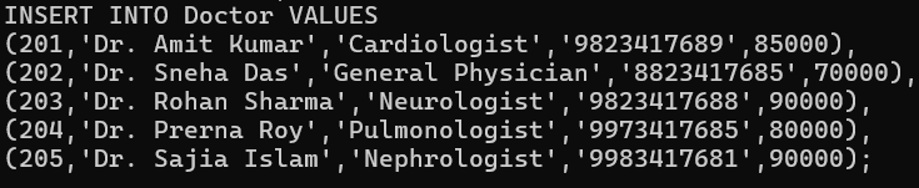
Insert Doctor Records
Insert Appointments

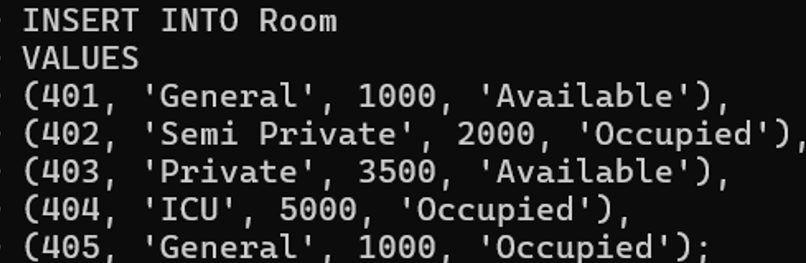
Insert Room Records
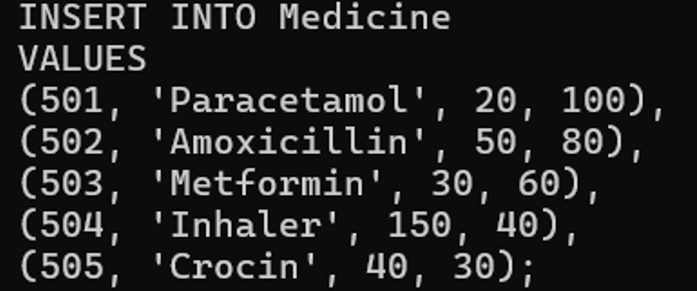
Insert Medicine Records
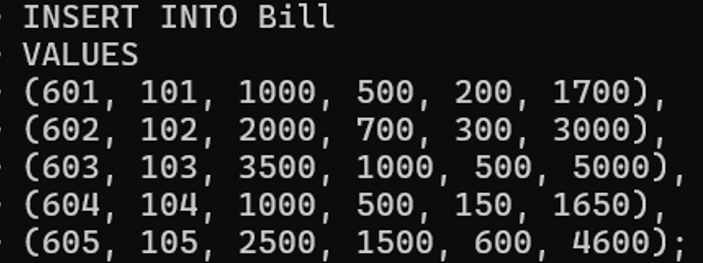
Insert Bill Records
Display All Patients

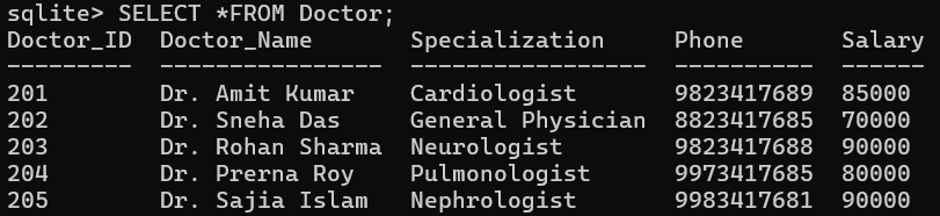
Display All Doctors
Display Appointments

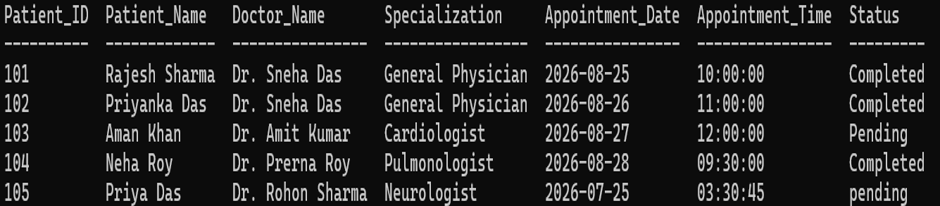
Display Patient and Doctor Details
SELECT Patient.Patient_ID, Patient.Patient_Name, Doctor.Doctor_Name, Doctor.Specialization, Appointment.Appointment_Date,Appointment.Appointment_Time,Appointment.Status FROM Appointment JOIN Patient ON Appointment.Patient_ID = Patient.Patient_ID JOIN Doctor ON Appointment.Doctor_ID = Doctor.Doctor_ID;
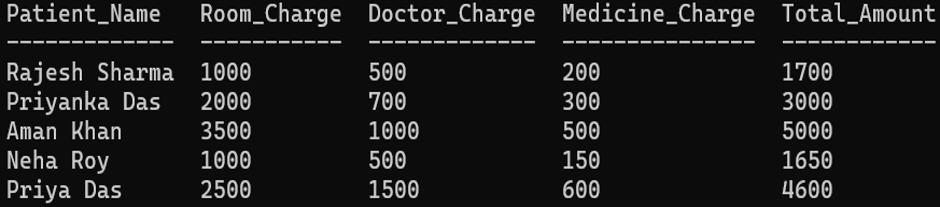
Display Patient Bills
SELECT Patient.Patient_Name, Bill.Room_Charge, Bill.Doctor_Charge, Bill.Medicine_Charge, Bill.Total_Amount FROM Bill JOIN Patient ON Bill.Patient_ID = Patient.Patient_ID;
Calculate Total Hospital Revenue
SELECT SUM(Total_Amount) AS Total_Revenue FROM Bill;
